What is EDI Mapping? Expert EDI Mapping Guide

If you're already EDI capable, you may find EDI mapping simple, but once your EDI supply chain partner network gets large enough it can become a nightmare. Learn how to convert files to EDI mapping standards with ease to automatically communicate with your trading partners more effectively.
- What Is EDI Mapping and How Does It Work?
- How to Set Up Your EDI Map
- Why Do You Need an EDI Map?
- EDI Map Development Best Practices
- Manual EDI Mapping Alternatives
- Choosing An EDI Mapping Software: Important Factors
- EDI Mapping for Modern Businesses
If you're using EDI, then you may have already realized a big problem:
Your internal business systems don't automatically understand and process EDI data.
Your backend systems (such as SAP for example) require different internal data formats (like CSV, IDoc, XML, etc.).
The solution?
Your EDI data must be translated to the required system format, and vice versa. This translation process can only be enabled via EDI mapping.
What Is EDI Mapping and How Does It Work?
EDI is the standardized format which EDI documents like purchase orders and invoices use to exchanged between companies. Because trading partners use different internal data systems (like ERPs, WMS, TMS, etc.), EDI mapping ensures the data formats are translated properly for seamless data exchange.
Simply put, EDI mapping is the process of translating data between different formats, enabling seamless understanding and processing by the recipient's system. Essentially, it's what connects two disparate systems for fully automated communication.
More specifically, the EDI mapping process defines the translation rules to convert internal data formats (e.g., CSV, SAP IDoc, XML, etc.) into standardized EDI formats (e.g., ANSI X12, EDIFACT, etc.), ensuring accurate and seamless data flow. This may involve reformatting data, translating codes, and converting file types. Typically, EDI data mapping is performed using specialized software or tools that can automate the process.
Distributors and retailers develop specific EDI guidelines that specify the data they want for every transaction. To be EDI compliant, you need a map that corresponds to the required data format of your trading partner.
During an EDI to ERP mapping event, data structures are translated from an EDI standard format (EDIFACT, ANSI X12, OFTP2, etc.) to a proprietary file that can be easily ingested into a back end system (CSV format, txt, SAP IDoc, Flat File, or another ERP specific format).
It is important to note that EDI mapping software allows EDI platforms to create EDI maps bidirectionally, originating from an ERP, or originating from a trading partner. So, IDoc to EDI mapping is the reverse of EDI mapping to IDoc.
The diagram below illustrates one of many EDI mapping examples using an EDI mapping tool like Cleo Integration Cloud:
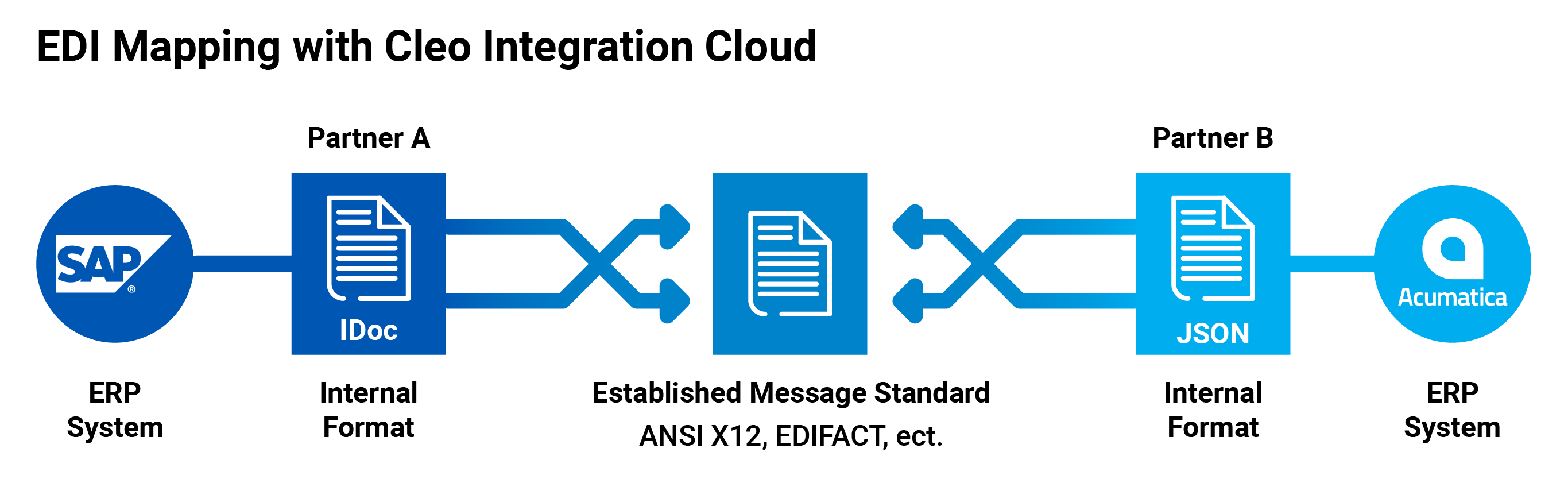
In this example, the SAP ERP system on the left hand side uses an IDoc internal format. To communicate a message to a trading partner, that IDoc file needs to be converted into an EDI transaction and sent to a trading partner using a standardized EDI Format like ANSI X12 or EDIFACT.
Because the trading partner's ERP (Acumatica) uses JSON for its internal format, the EDI file is converted into a JSON file before being ingested into Acumatica ERP on the right hand side.
Again, it is important to note that mapping for EDI systems is bilateral, so our explanation is not limited to a left to right workflow. EDI providers map dataflows in both directions.
EDI mapping tools are specialized software applications that help businesses create, manage, and maintain the data transformations required for successful EDI communication. These tools support both direct and indirect (canonical) mapping methods, offering a visual or code-based interface to define how data should be translated between different formats.
How to Set Up Your EDI Map
Setting up an EDI map involves a series of sequential stages. Don't rush this process, as accuracy here saves significant headaches down the line.
Step 1: Data Analysis
Before you can translate, you need to understand the languages. This initial, critical step is about thoroughly examining the data formats of both your system and your trading partner's.
- Your Internal Data:
- Identify Your Data Sources: Where does the information for, say, a purchase order (like customer name, item quantity, price) live within your system? Is it in your ERP (e.g., SAP, Oracle, NetSuite), a database, or even a specific spreadsheet?
- Map Your Data Fields: Document every relevant piece of information you send out (e.g., your "ProductCode" field, your "CustomerAddressLine1" field) and every piece of information you expect to receive (e.g., your partner's "OrderConfirmationNumber"). Note their exact names, data types (text, number, date), and lengths.
- Understand Your Internal Process: How does data flow within your business today? For example, when you receive an order, what steps are taken, and what data is generated or consumed?
- Your Trading Partner's EDI Requirements:
- Obtain Their EDI Implementation Guide: This is your bible! Your trading partner will provide a detailed document (often called an "Implementation Guide" or "Mapping Guide") for each specific EDI document you'll exchange (e.g., for an 850 Purchase Order, an 810 Invoice, or an 856 Advance Ship Notice).
- Familiarize Yourself with the EDI Standard: This guide will specify the particular EDI standard they use (most commonly ANSI X12 in North America, or EDIFACT globally) and the specific "transaction sets" you'll be using.
- Decode Their EDI Structure: The guide breaks down each EDI document into segments (logical groupings of data) and elements (individual pieces of data within a segment). You'll need to understand their required segments and elements, their order, and any specific codes or values they expect. For example, a "currency code" might need to be "USD" for US Dollars, not just "Dollar."
Step 2: Mapping Specification
Now that you understand both systems, you'll define the exact rules for converting data between them. This is often done using specialized EDI mapping software or by working closely with an EDI service provider.
- Field-to-Field Correspondence: For every data field you identified in Step 1 (from your system), you'll specify which exact EDI element it corresponds to in your partner's standard.
- Example: Your internal "CustomerID" might map to the "N104" element in the "BT" (Bill-To) segment of an 850 Purchase Order.
- Data Transformations: Often, a direct one-to-one mapping isn't enough. You'll define rules for how data needs to be modified:
- Concatenation: Combining multiple internal fields into one EDI element (e.g., combining your "StreetAddress" and "ApartmentNumber" fields into a single EDI address line).
- Splitting: Taking one internal field and breaking it into multiple EDI elements.
- Default Values: If your internal system doesn't always provide a required EDI element, you might set a default value.
- Value Lookups/Cross-Referencing: Converting your internal product codes or unit-of-measure codes into your partner's specific EDI codes (e.g., your "EA" (each) might need to become "PCE" for your partner).
- Calculations: Performing calculations on your data before sending it (e.g., calculating a total weight).
- Conditional Logic: Define rules based on conditions. For example, "If the order type is 'rush,' then populate this specific EDI segment; otherwise, omit it."
- Error Handling: Plan for what happens if expected data is missing or in the wrong format.
Step 3: Mapping Implementation
With your specifications defined, it's time to build the actual translation mechanism.
- Choose Your Tool:
- EDI Translation Software (On-Premise): You might purchase and install software on your own servers. This offers maximum control but requires internal IT expertise.
- Cloud-Based EDI Solution (SaaS/Managed Service): Many businesses opt for a third-party provider to handle the mapping, translation, and communication. This can reduce your IT burden and accelerate implementation. Your provider will typically do the actual configuration of the mapping rules you specified.
- Configure the Mapping: Using your chosen software or service, you'll configure the rules defined in Step 2. This involves selecting source fields, dragging them to target EDI elements, and applying transformation functions.
- Develop Connectors (if needed): Your mapping solution needs a way to "talk" to your internal system. This might involve setting up direct database connections, APIs, or file transfers (e.g., your system outputs a CSV file that the EDI software picks up).
Step 4: Testing – Verify Every Translation
This is a crucial stage where you ensure everything works as intended before live data is exchanged. Do not skip or rush testing!
- Internal Testing:
- Generate Test Files: Create sample data from your internal system that mirrors real-world scenarios (including edge cases and potential errors).
- Run Through Mapping: Process these test files through your configured map to ensure the output EDI documents look exactly as your partner expects according to their guide.
- Validate Inbound: If you're receiving EDI, simulate inbound documents from your partner and ensure your map correctly translates them into a format your system can understand and process.
- Partner Testing (Trading Partner Certification):
- Exchange Test Documents: Your trading partner will have a "test" or "certification" environment. You'll send them test EDI documents (e.g., test 850 Purchase Orders), and they'll send you test acknowledgments (like a 997 Functional Acknowledgment) or other test documents back.
- Review and Correct: Work closely with your partner to identify any discrepancies. If their system rejects your test document, they'll provide an error report (often via a 997 FA). You'll then go back to your mapping, adjust it, and retest until both sides are perfectly aligned. This iterative process continues until your mapping is "certified" by your partner.
Step 5: Deployment – Go Live and Maintain
Once testing is complete and both you and your trading partner are confident, you move to live operations.
- Transition to Production: Your configured maps and communication channels are moved from the test environment to the live production environment.
- Monitor: Once live, continuously monitor your EDI transactions. Most EDI solutions have dashboards to show successful and failed transactions. Set up alerts for any errors.
- Ongoing Maintenance: EDI maps aren't "set it and forget it."
- Partner Changes: Your trading partner might update their EDI requirements (e.g., add a new field, change a code). You'll need to update your maps accordingly.
- Internal System Changes: If you upgrade your ERP or change your internal data structures, your maps will likely need adjustments.
- New Partners/Documents: As you bring on new trading partners or exchange new types of documents, you'll repeat this mapping process.
The mapping specification process involves identifying the data elements in one system's format and mapping them to corresponding data elements in another system's format. This step ensures that data can be accurately and consistently interpreted between systems.
This process includes specifying the data types, lengths, and formats of each data element. It also defines any necessary transformations or validations that must occur during the data translation process to maintain data integrity.
Once these mapping rules are clearly defined, they are typically implemented using EDI tools known as EDI translators or EDI converters (mapping software). These tools automate the conversion of data from one format to another based on the established rules.
With EDI mapping implemented and thoroughly tested, trading partners can exchange business documents electronically in a seamless manner. This electronic exchange improves operational efficiency and reduces errors compared to manual data entry or paper-based workflows.
Types of EDI Mapping
1. Direct Mapping (1:1 Mapping)
Direct mapping involves creating a unique, one-to-one (1:1) data translation between a source structure and a target structure. Each trading partner pair requires its own custom mapping, which directly transfers data elements from one format to another. This approach defines the exact relationship between the two partners’ data formats but can become complex and difficult to scale as the number of partners increases.

2. Indirect Mapping (Canonical Mapping)
Indirect, or canonical, mapping uses an intermediate data model—known as an abstraction layer—to simplify EDI integration. In this model:
- Each trading partner's EDI message is first mapped to a canonical format (a standardized internal structure).
- Then, a company-specific mapping converts this canonical format into the internal format required by the receiver’s system (e.g., an ERP format like SAP IDoc).
This two-step mapping process reduces complexity by avoiding the need to build custom 1:1 mappings for every partner. It streamlines change management, improves scalability, and makes maintaining EDI integrations more efficient. With this model, you only need one internal process, two mapping layers, and any number of partner-specific mappings.
Why do you need an EDI map?
Most retailers and automotive vendors act as EDI hubs, meaning they define and enforce specific requirements for electronic communication with their trading partners. These organizations typically publish their own EDI guidelines, which outline the expected data structures, communication protocols, and usage rules for EDI transactions.
Within these guidelines, EDI hubs specify which segments, elements, and codes must be used, and clarify which ones are mandatory versus optional. While this helps narrow down the broad EDIFACT and ANSI X12 message standards to meet industry- or company-specific needs, it introduces a new layer of complexity.
The challenge arises when suppliers work with multiple customers, each with their own unique EDI requirements. In such cases, suppliers must create and maintain custom EDI mappings for each customer to ensure compliance with their respective guidelines. This often results in a need for direct point-to-point mappings for each trading partner, all of which must be individually written, rigorously tested, and continuously maintained—making the EDI process significantly more resource-intensive.
EDI mapping is essential for businesses that rely on EDI to communicate with partners and vendors. It acts as a translator, converting outgoing documents into the required formats that trading partners require. This allows the trading partners’ systems to understand the information being received. EDI mapping also translates incoming documents into a format that a company's internal systems (e.g. ERP) can understand.
Without EDI maps, companies risk non-compliance with EDI mandates, which many retailers and vendors strictly enforce to do business. Non-compliance can lead to costly fines, damaged business relationships, and negative vendor scorecards—all of which can lead to the loss of future business opportunities.
By ensuring documents are correctly translated and formatted, EDI mapping facilitates seamless communication, enhancing efficiency and reducing the chances of errors or miscommunications that could disrupt operations. In a digital landscape where speed and accuracy are paramount, an effective EDI mapping strategy is indispensable for maintaining competitive edge and operational continuity.
3 Benefits of EDI Mapping
- Automation — EDI mapping automatically sends external data to critical internal systems, creating a repeatable process.
- Accuracy — EDI mapping eliminates manual processes, eliminating the risk for user error, and ensuring EDI data is accurately imported into back-end systems.
- Connection — EDI mapping allows for the creation of formats like XML or flat file that can easily be used to communicate EDI data to business trading partners.
Successful electronic data interchange implementations must begin with the development and employment of efficient object naming conventions using "best practices," to avoid aggravation and redevelopment at a later time.
This is of particular advantage when creating files (tables) to store EDI data.
File tables are created during the implementation and deployment of EDI interface/staging files and in support of both inbound and outbound EDI transactions.
3 Challenges of EDI Mapping
While EDI mapping is a common process companies have to navigate, it can be tricky. Hurdles that businesses often run into include:
- Customized Solutions for Diverse Requirements: Every trading partner—i.e. Walmart, Amazon, FedEx, and 3M—has its own unique integration protocols that businesses must comply with to conduct business. Look for an integration solution that provides any-to-any integration and vast protocol support that is regularly updated, so you are always able to connect, whether now or in the future.
- Continuous Mapping Updates: From time to time, trading partners will update and change their protocols. In order to keep an integration up and running, companies have to change and update their maps to ensure compliance. Look for an integration solution that enables you to perform updates easily, so this routine task is not a heavy lift.
- Choosing the Best Software for Your Needs: With so many EDI mapping solutions on the market, it can be difficult to find the best one for your unique business needs. Be sure to look for a solution that will help you reach your project goals, contains all the features you need, and has access to quality customer service, instead of just going for the “biggest name” or cheapest options on the market. This will save you time and money in the long run.
Nonetheless, the benefits of EDI mapping far outweigh the few challenges, especially if you want to scale your business, create operational efficiencies, and streamline communication.

Level Up Your Supply Chain: Explore Our EDI Solution
You’ve taken the first step towards a smoother supply chain by finding this blog - now discover how our EDI solution automates data exchange, saving you time and boosting efficiency.
EDI Map Development Best Practices - Files and Fields
EDI map development involves the creation of interface files to translate one form of data into another.
EDI interface files generally support both the Enterprise Resource Planning (ERP) applications and the EDI transactions exchanged with trading partners.
The types of files used depend on business requirements and how you will process data within the ERP. Implementation could be affected by the degree of external programming, and how many custom programs are designed for interfacing with the EDI database files.
When creating EDI interface files, it is important to develop and standardize in-house naming conventions that can be used for all files.
This will help to identify a file's purpose and keep your files organized. Remember, you may not be the only source who must use or have access to these files. Below is a list (with examples) of items that should be considered when developing both a file and field naming scheme:
Direction Code: In, Out, Send, Receive
Map/Transaction Type: 810, 850, INV, PO
Structured Data Levels: Header, Detail, Address, Note
Segment Labels: BEG, IT1, N1, MSG
Element Labels: BEG01, IT102, N104
When identifying field (column) names, taking the time to include Element ID and Element Description detail will speak volumes when future technicians must figure out the data because the original file specs conveniently disappeared.
One recommendation is to include all Segment and Element descriptions in the metadata. This also significantly simplifies field searching when building maps or developing programs.
Consider the following two examples:
Field Name: "PONUM" Description: "Purchase Order Number BEG03"
Field Name: "CSTORD" Description: "Cust Ord #"
A glance will quickly reveal how the simple use of common and consistent conventions can have a noticeable effect on interfaces (programs, maps, etc) that access data, by improving search functions and removing the possibility of field misuse and abuse.
By taking the time to define and apply best-practice naming conventions before any development, EDI interfaces can be built once and used many times.
The alternative is to make customized changes until the interface (and the adding of new objects) grows out of control. Keeping your files and fields organized by using standards for naming and descriptions can make mapping a breeze.
Held Back by Manual EDI Mapping?
Manual EDI mapping requires human intervention in the shape of a ‘mapper’ and a developer.
This requires a mapper to use spreadsheets to manually enter critical pieces of information into the correct fields, while simultaneously verifying the data complies with each particular trading partner’s requirements.
The developer then takes the spreadsheet and transforms the data into specific code that the trading partner’s receiving program can understand and process. As you can imagine, this process is not only time-consuming, but since it is very detail intensive, it is extremely error-prone. One incorrect move and the entire process can be delayed or inaccurate, leading to negative vendor scorecard reviews, poor trading partner relationships, and costly fines.
A Better Alternative to Manual Mapping
Thankfully, manual point-to-point mapping isn't the only option. Sophisticated EDI software—like Cleo—automates data mapping while still allowing for custom adjustments when necessary. This significantly reduces the time, complexity, and risk typically associated with traditional EDI integration methods.
Leverage a Pre-Built Network
Rather than building individual integrations from scratch, companies can tap into Cleo's extensive network of thousands of pre-connected trading partners. For many businesses, this translates to 90% fewer direct mapping responsibilities, dramatically accelerating onboarding and reducing integration overhead.
Automate Core EDI Functions
Cleo’s platform offers robust automation capabilities to streamline key EDI operations, including:
- Document transformation across multiple formats, including JSON, X12, EDIFACT, XML, and flat files.
- Real-time EDI data validation to ensure mapping accuracy before partner transactions occur.
- Custom rule creation for faster identification and resolution of data errors.
- Visual data mapping tools that offer multiple views of EDI transactions, making information more accessible and easier to manage.
The Bottom Line
Cleo’s robust EDI platform simplifies what is traditionally a complex and time-consuming mapping process. With automation, prebuilt partner connections, and flexible transformation tools, Cleo empowers businesses to scale EDI operations faster and more reliably.
Choosing An EDI Mapping Software: Important Factors
When it comes time to pick the best EDI software for your business, be sure to consider:
Translation Features
X12 is a large file type that is commonly used in the U.S. However, ERPs often can only process smaller file types like XML or JSON. So companies frequently need EDI software that can convert larger file types (like X12) into more manageable, smaller files like JSON or XML.
Custom Procedures
Every trading partner has different requirements. Your EDI software should let you customize processes, integrations, and the automation that powers them, for each individual trading partner.
Transparent Pricing
EDI software pricing models can vary greatly depending on the provider. Make sure you fully understand how you will be charged for the product and services, so you do not end up with a bill that is much larger than expected.
Scalable Solution
Businesses grow. Therefore, it is imperative your EDI mapping software can grow alongside your company. Otherwise, the solution will hinder the success of your business and you will either be stuck with it or you will have to migrate to another solution, which is additional work that could be prevented by picking a scalable solution.
Flexible Service Offerings
There comes a time for most businesses when they could use the assistance of extra support. Especially if you think your business will grow, having the option to utilize your vendor’s managed services team can be critical. While some EDI software providers offer no support, others may offer services regarding:
Implementation and migrations
Trading partner onboarding
Error resolution
Updates and maintenance
Also, look into whether the provider’s service models fit your needs. Do they offer self-service, managed services, and/or a blended approach?
Real-Time Visibility
What good is an EDI mapping solution if you can’t see what’s going on inside it? An EDI mapping solution should allow you to dig down into each transaction so you can view key information. Additionally, visibility into any errors or issues is also critical to minimize supply chain disruption and reduce system downtime.
Fast Onboarding
Some providers offer pre-built schemas, rulesets, and business processes that can be easily customized to integrate with common eCommerce stores, visibility platforms, and backend systems—i.e. Shopify, Project44, Salesforce, TMW Systems, and more.
Supply Chain Orchestration
If your operations include revenue-critical workflows like order-to-cash, look for a platform that goes beyond mapping and document exchange. Supply chain orchestration connects real-time visibility to automation, partner scorecarding, and faster exception resolution across your multi-enterprise network, helping protect outcomes like OTIF and SLA performance.

Ready to Take Your EDI Research to the Next Level?
You've explored the benefits, now see how it applies to you! Get a personalized consultation on how our EDI solution can streamline your supply chain. Just provide some information for a free, no-obligation assessment.


EDI Mapping for Modern Businesses
EDI mapping is critical to meeting trading partner demands, eliminating manual entry, and streamlining the movement of data from front-end to back-end systems.
Modern EDI mapping software lets you convert EDI to other prevalent data formats, as well as to other EDI formats. This EDI mapping process will deliver complete control over business data, as well as enhanced EDI visibility through the delivery of accurate and automated EDI data to the back-end systems.
Here is an example diagram of an EDI map for a hypothetical trading partner:
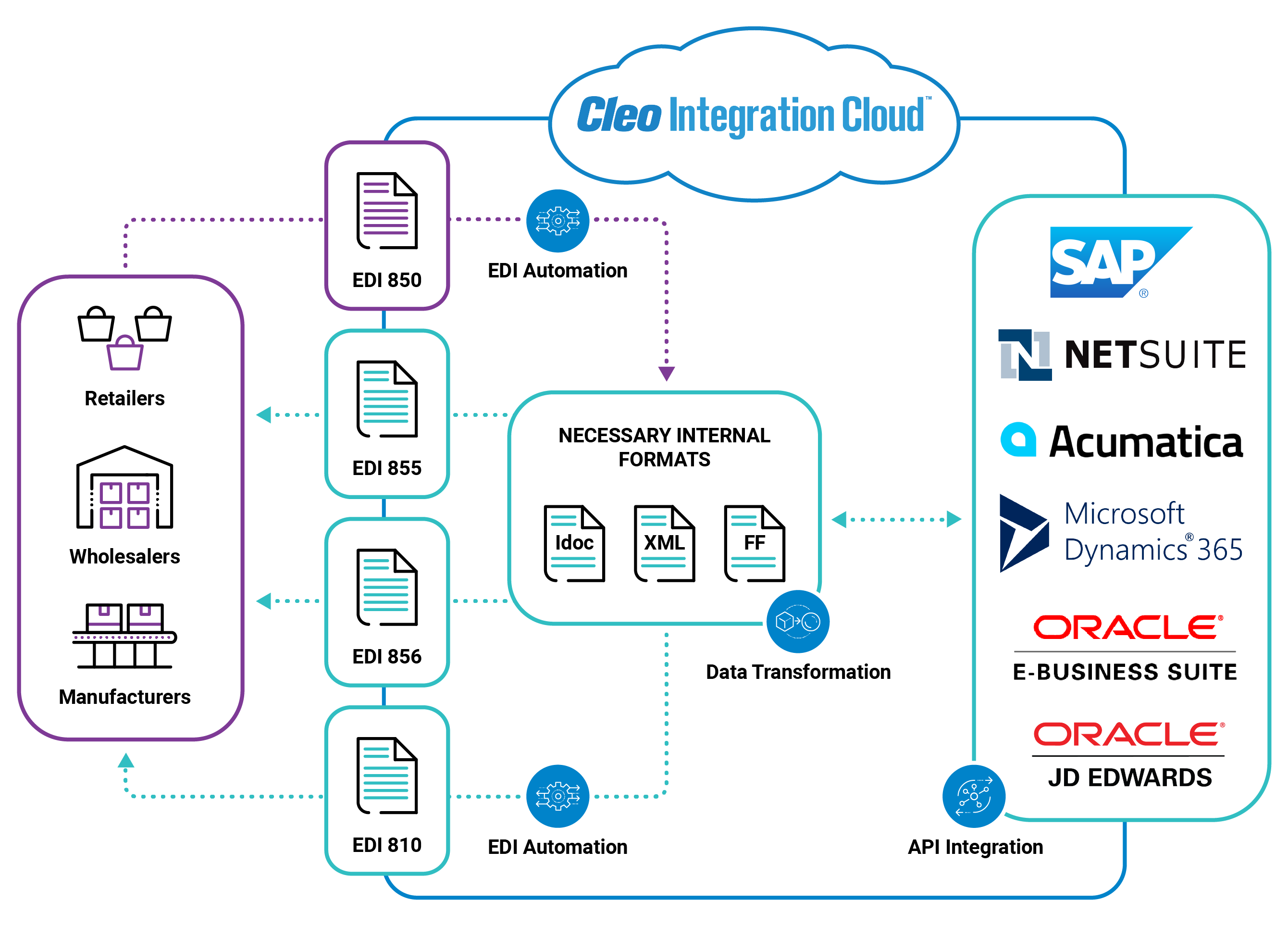
The creation and maintenance of one or two EDI maps can be done in-house, but as standards change, certificates expire, and trading partner demands grow, companies are increasingly likely to adopt a managed services approach to EDI mapping.
Beyond the Basics: Exploring EDI Mapping in Depth
While the blog post provides a solid foundation for understanding EDI mapping, you might have further questions as you delve deeper into its practical application. Here, we address three common inquiries that can help you navigate the intricacies of EDI mapping:
1. Can I use generic mapping tools for EDI instead of specialized software?
While it's technically possible to utilize generic mapping tools for basic EDI mapping, there are several drawbacks to consider:
- Limited functionality: Generic tools might not offer the specific features and pre-built maps designed for EDI standards, requiring extensive manual configuration.
- Error susceptibility: The complexity of EDI data formats and validation rules can increase the risk of errors if using generic tools, potentially causing delays and disruptions.
- Lack of expertise: Specialized EDI mapping software often comes with dedicated support and training resources, crucial for navigating the nuances of the process.
Therefore, while generic tools might seem like a cost-effective option initially, the potential for errors, limited functionality, and lack of specialized support can outweigh the initial savings.
2. How can I handle complex data transformations during EDI mapping, such as currency conversion or unit changes?
Most specialized EDI mapping software offers robust capabilities for handling complex data transformations. These features typically include:
- Built-in functions: Pre-programmed functions for common transformations like currency conversion, date formatting, and unit changes simplify the process.
- User-defined functions: The ability to create custom functions allows you to address specific data manipulation needs unique to your business processes.
- Mapping logic: Utilize conditional statements and logic operators within the mapping process to perform targeted transformations based on specific data values.
By leveraging these functionalities, you can effectively handle complex data transformations within your EDI mapping, ensuring accurate and consistent data exchange.
3. What are the best practices for ensuring the accuracy and consistency of data during EDI mapping, especially with large data volumes?
Maintaining data integrity is paramount throughout the EDI mapping process. Here are some best practices to ensure accuracy and consistency, especially when dealing with large data volumes:
- Thorough testing: Implement a rigorous testing strategy to identify and rectify any mapping errors before going live. This includes testing with various data scenarios to ensure they are handled correctly.
- Data validation: Utilize data validation rules within the mapping process to automatically check for errors in incoming data and prevent invalid information from being transmitted.
- Data monitoring: Regularly monitor the quality of your EDI data to identify any potential issues and ensure consistency over time.
By implementing these practices, you can minimize the risk of errors and maintain the accuracy and consistency of your data, even when dealing with large volumes.
Remember, successful EDI implementation requires careful planning and attention to detail. By addressing these additional questions and leveraging the capabilities of specialized EDI mapping software, you can ensure a smooth and efficient data exchange process for your business.
The Best EDI Mapping Software in the Industry
Cleo offers a bit of everything to meet your EDI needs, from automated EDI mapping software for faster trading partner onboarding, to self-managed EDI integration that gives your team more control and agility, plus supply chain orchestration that unifies API, EDI, and MFT on one AI-native platform to deliver real-time data and resolve disruptions 85% faster.
Because Cleo has become an industry leader in the EDI mapping and supply chain orchestration software space, we offer out-of-the-box EDI maps for connecting to major companies across the supply chain.
With Cleo, EDI mapping is taken care of and you can focus on what's most important to your business: your customers.
Cleo's cloud-based EDI platform automates EDI mapping processes that connect, transform, and route EDI and non-EDI documents between internal and business partner applications, without the need for custom code.