Turn every order into revenue without manual handoffs.
Cleo Integration Cloud connects customers, channels, and internal systems to automate the complete order-to-cash cycle—from purchase order receipt and fulfillment through shipment, invoicing, and payment.
Move from exchanging documents to executing every order.
Order-to-cash breaks down when customers, systems, documents, and teams operate in separate workflows. Cleo provides one execution layer to keep the physical and financial sides of the order aligned.
Accelerate cash velocity
Move accurate orders, fulfillment updates, shipment details, and invoices between partners and systems without rekeying data.
Protect margins
Surface missing acknowledgments, late shipments, invoice discrepancies, and compliance exposure before they become deductions.
Resolve issues faster
Use Cleo AI to categorize exceptions, explain root cause, recommend recovery paths, and help teams restore the workflow.
Scale every channel
Support EDI, API, Web EDI, marketplaces, and document-based orders without creating a separate operating model for each.
Automate the business documents that move an order to cash.
Cleo orchestrates the order as a connected process—preserving context as each transaction moves between customers, ERP, warehouse, transportation, finance, and other fulfillment systems.
Receive the order
Capture customer orders and validate required data before routing them into the right back-office workflow.
Confirm the order
Return an accurate acknowledgment with accepted quantities, dates, changes, and customer-specific item data.
Release fulfillment
Send the order to warehouse and fulfillment systems while preserving the customer promise and business rules.
Ship and notify
Coordinate shipment confirmation, ASN details, cartons, labels, carrier data, and fulfillment milestones.
Invoice and reconcile
Generate accurate invoices, validate totals against fulfillment, and connect remittance data to financial systems.
Give operations, customer service, and finance the same answer.
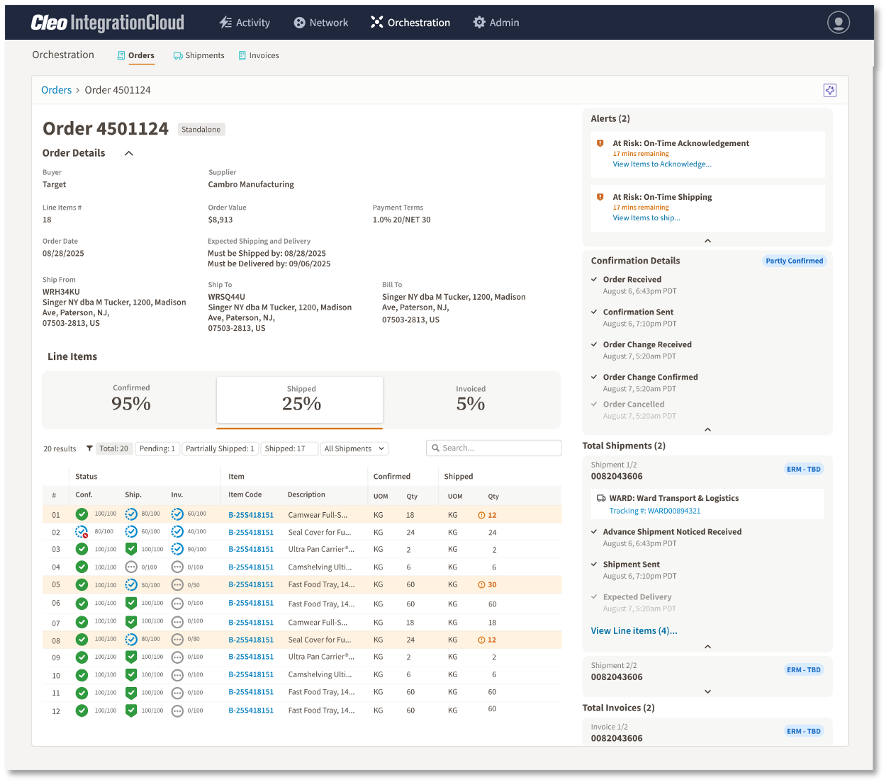
Track an order from receipt through acknowledgment, shipment, and invoice in one business-level view. Cleo connects each milestone to the supporting transactions so teams can answer customers without chasing data across systems.
- See confirmed, shipped, and invoiced quantities at line-item level
- Identify late or missing milestones while action is still possible
- Trace business status into the exact document or integration event
- Give nontechnical teams usable order context without a support ticket
One order-to-cash strategy, regardless of partner maturity.
Customers should not have to use the same technology for your team to run one consistent process. Cleo normalizes different channels into connected, governed workflows.
Integrated EDI
Automate X12, EDIFACT, and other B2B transactions over AS2, SFTP, VAN, and additional protocols, connected directly to ERP and fulfillment systems.
Explore EDI automation →APIs and applications
Connect real-time order channels, eCommerce, marketplaces, logistics providers, and cloud applications while orchestrating the same downstream process.
Explore EDI & API →Web EDI
Give lower-volume partners a browser-based path to receive orders, create acknowledgments and ASNs, print labels, and submit invoices.
Explore Web EDI →Non-EDI documents
Digitize purchase orders, invoices, and other document-based transactions so manual channels can participate in governed automation.
Explore document automation →Connect the customer promise to physical and financial execution.
Cleo Integration Cloud sits between your business systems and ecosystem to translate, validate, route, and monitor order-to-cash transactions across EDI, API, portal, and application workflows.
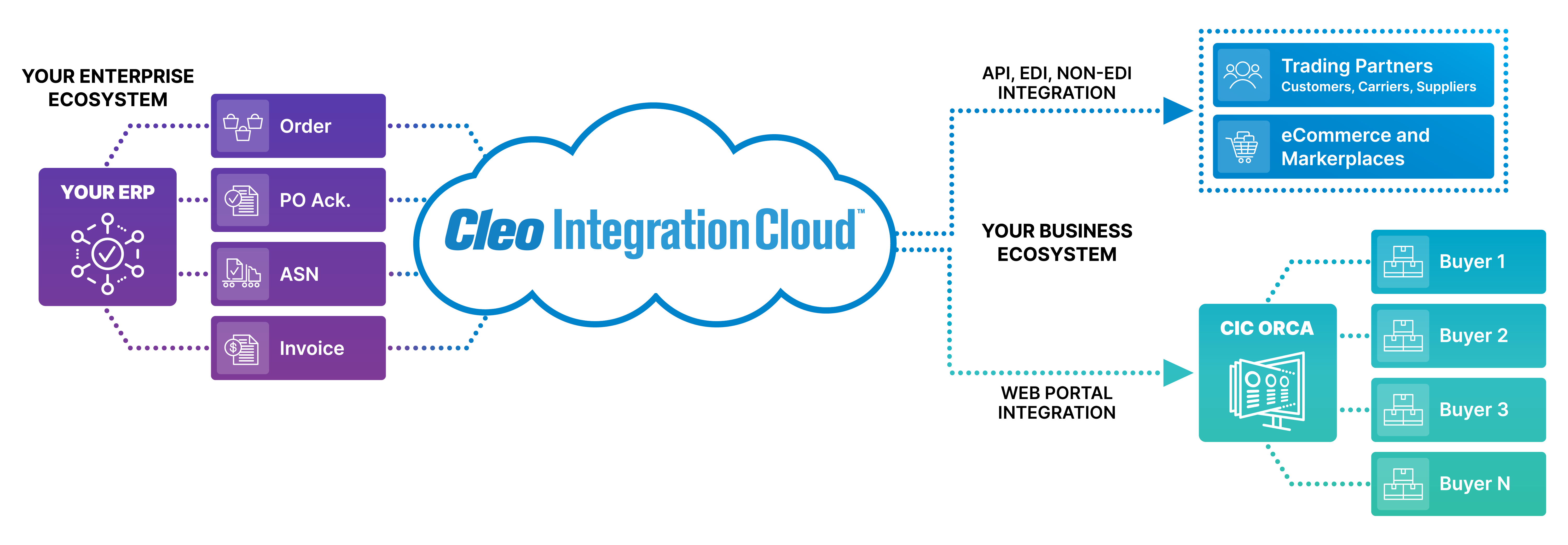
Swipe horizontally to view the complete architecture.
Detect. Understand. Resolve. Keep the order moving.
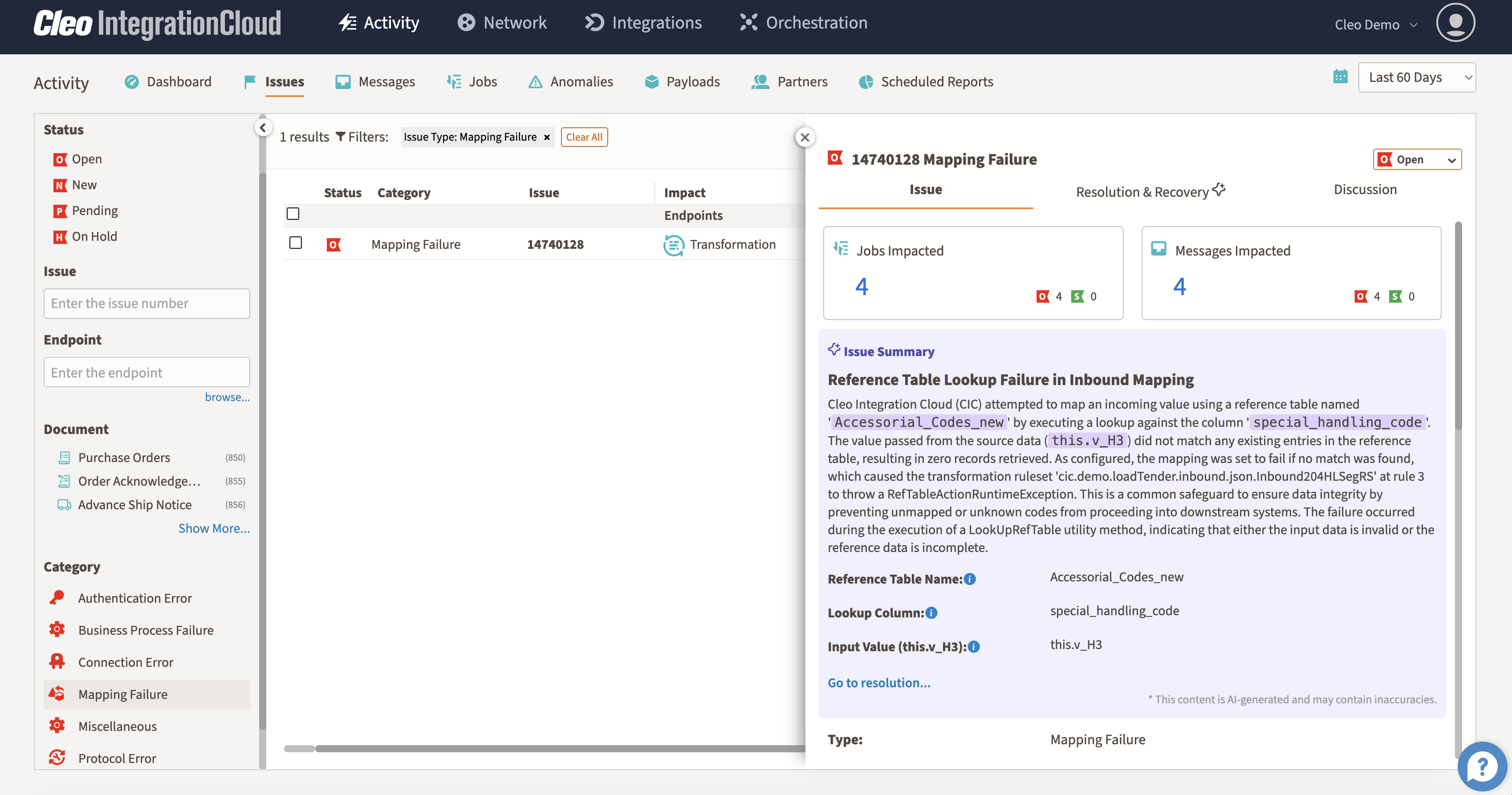
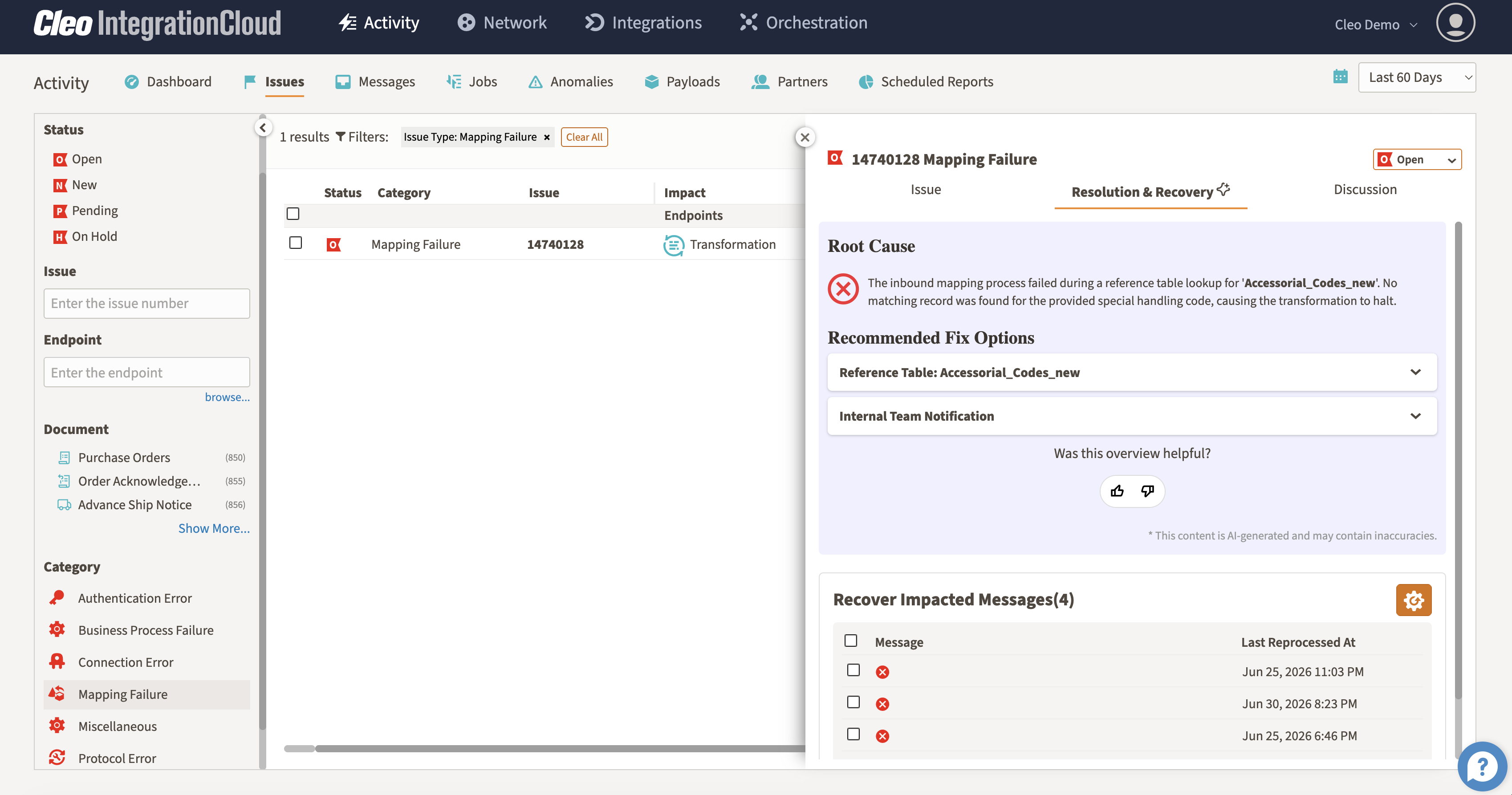
Passive monitoring tells you that something failed. Cleo AI helps explain what failed, why it matters to the business process, and what should happen next.
- Organize connectivity, data, mapping, and process issues into actionable categories
- See the orders, documents, jobs, and partners affected by each exception
- Review AI-generated issue summaries, root-cause context, and recommended fixes
- Recover impacted messages and restore the workflow with less manual investigation
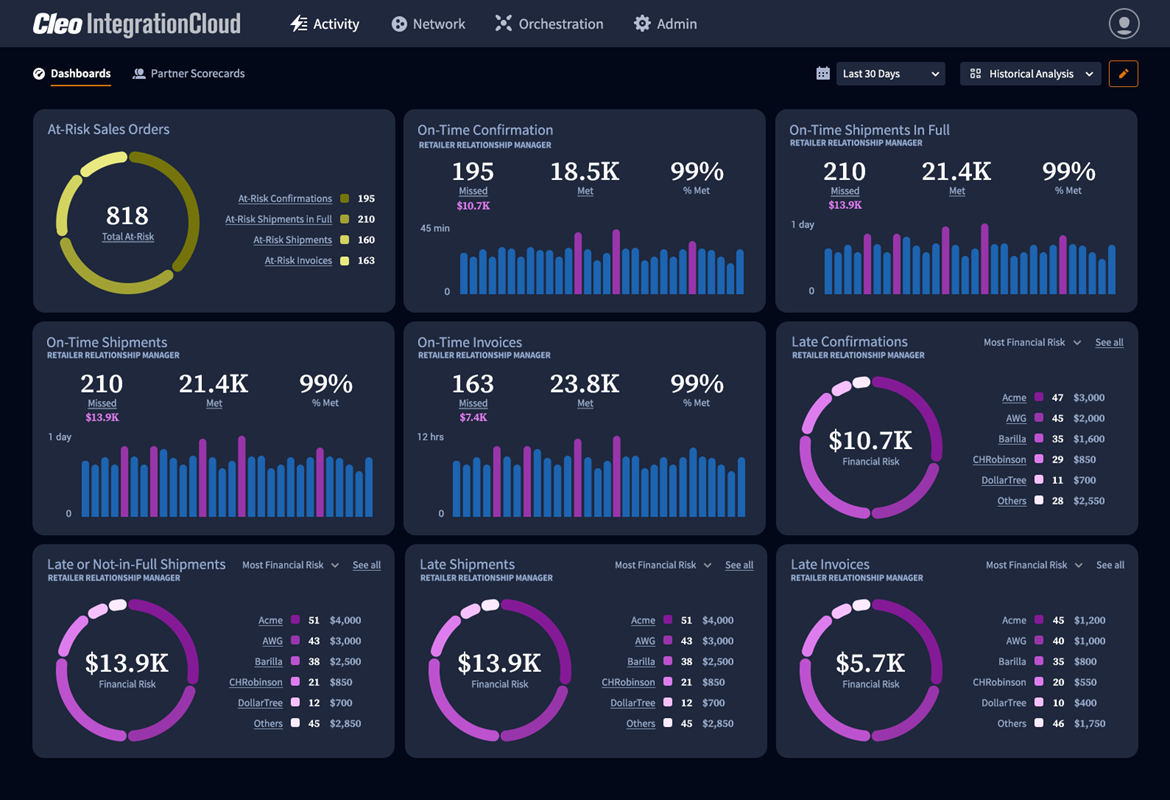
Find revenue risk before it becomes a deduction.
Late acknowledgments, incomplete shipments, missing ASNs, and inaccurate invoices can turn a fulfilled order into lost margin. Cleo brings at-risk orders and their financial exposure into the same operational view.
- Prioritize orders by compliance deadline and financial risk
- See at-risk confirmations, shipments, and invoices together
- Connect retailer performance requirements to live execution data
- Intervene before preventable issues become chargebacks
See browser-based order-to-cash for Web EDI partners.
Not every customer or supplier is ready for direct integration. This demo shows how Cleo Web EDI guides users through purchase orders, acknowledgments, ASNs, labels, and invoices while reducing manual entry and improving document accuracy.
- Email inbox-style document management
- Pre-populated 855, 856, and 810 transactions
- Guided pick-and-pack and label workflows
- Built-in validation and required-field guardrails
Control the operation. Extend your team when you need to.
Cleo supports different operating models, from teams that manage integration directly to organizations that want Cleo experts to help run day-to-day EDI and ecosystem operations.
Operate with direct control
Build, monitor, manage, and optimize order-to-cash workflows with your internal integration and operations teams.
Let Cleo experts help run it
Extend your team with support for onboarding, mappings, monitoring, changes, issue handling, and ongoing operations.
Share responsibility
Keep control of strategic workflows while Cleo supports selected partners, processes, projects, or operational tasks.
Order-to-cash automation FAQs
What teams need to know when evaluating an integrated order-to-cash platform.
What is order-to-cash automation?
Order-to-cash automation connects the systems, partners, documents, and decisions required to receive an order, confirm it, fulfill it, ship it, invoice it, and reconcile payment with less manual intervention.
Which EDI documents are commonly used in order-to-cash?
Common X12 documents include the 850 purchase order, 855 purchase order acknowledgment, 856 advance ship notice, 810 invoice, and 820 payment order or remittance advice. Fulfillment may also involve warehouse and transportation transactions.
Can Cleo connect order-to-cash workflows to ERP, WMS, and TMS systems?
Yes. Cleo Integration Cloud connects partner transactions with ERP, WMS, TMS, accounting, shipping, marketplace, and other applications so the same order context can move through the complete business process.
Does every trading partner need integrated EDI?
No. Cleo can support integrated EDI and APIs as well as Web EDI and document-based workflows, giving lower-volume or less technical partners a practical way to participate without fragmenting the overall process.
How does Cleo AI support order-to-cash?
Cleo AI helps detect unusual activity, categorize exceptions, summarize affected workflows, explain likely root cause, recommend resolution paths, and support recovery of impacted messages.
How can automation help prevent chargebacks?
Connected automation makes it easier to identify late acknowledgments, shipping risk, missing documents, invoice issues, and other compliance gaps while there is still time to correct them before a deduction occurs.
Ready to turn order flow into revenue flow?
See how Cleo can connect your customers, channels, and systems to automate the order-to-cash lifecycle.