Trace the order. Understand the issue. Take the next step.
See how orders move between trading partners, Cleo Integration Cloud, ERP systems, and fulfillment teams. Follow the transaction evidence behind each status so you can tell what happened, where work stopped, and who needs to act.
Make every order status explainable
A status alone is not the full story. Cleo connects order milestones to their supporting messages, integration activity, and business data so operations, customer service, finance, and IT can investigate the same issue with shared context.
Monitor
View order milestones, partner exchanges, and the activity behind process health.
Detect
Identify missing milestones, transaction exceptions, and applicable compliance risk.
Investigate
Follow an order status into supporting documents and integration processing detail.
Act
Use AI-powered issue context and recommended steps to support human decisions.
From a business question to the source of truth
When a customer asks “Where is my order?”, the answer may depend on several systems. See how connected transaction evidence helps teams move beyond a single success or failure indicator.
What was requested?
Start with the incoming purchase order and its references, items, quantities, and requested dates (for example, EDI 850).
Was the order processed?
Review message receipt, transformation, validation, routing, and delivery events in Cleo Integration Cloud.
What happened next?
Connect the transaction to available ERP or warehouse order and fulfillment milestones, including shipment activity.
Was the partner updated?
Check the applicable acknowledgment, advance ship notice, or invoice and its corresponding processing status.
Example: an order is accepted, but the ASN is missing
Successful order receipt doesn't prove the shipment notice was sent. Follow the latest confirmed order, warehouse, and outbound EDI events to see which handoff needs attention. The exact milestones depend on the partner's process and connected systems.
- Was the order created and acknowledged?
- Did the warehouse confirm what shipped?
- Was the ASN generated, validated, and transmitted?
- Which team owns the next corrective step?
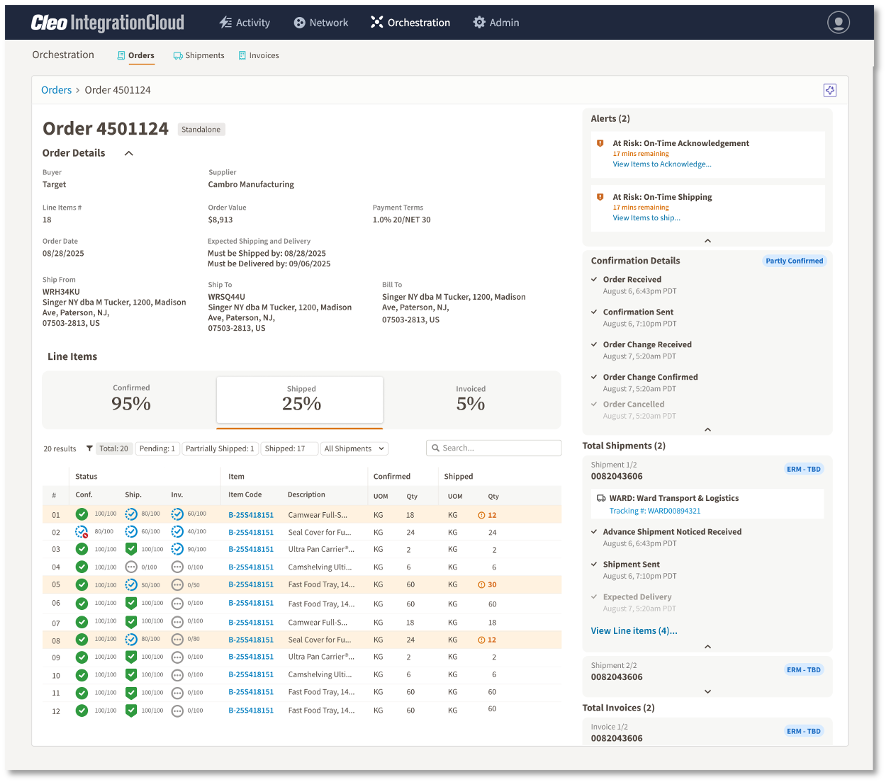
Track orders as they move across partners, documents, and systems
Follow relevant order milestones from receipt through acknowledgment, shipment, and invoicing, with access to the documents and integration activity behind the status.
- See current order status and milestone progress
- Identify delayed or missing business documents
- Help customer service and operations answer questions using the same evidence
- Move from order summary to transaction details and source references
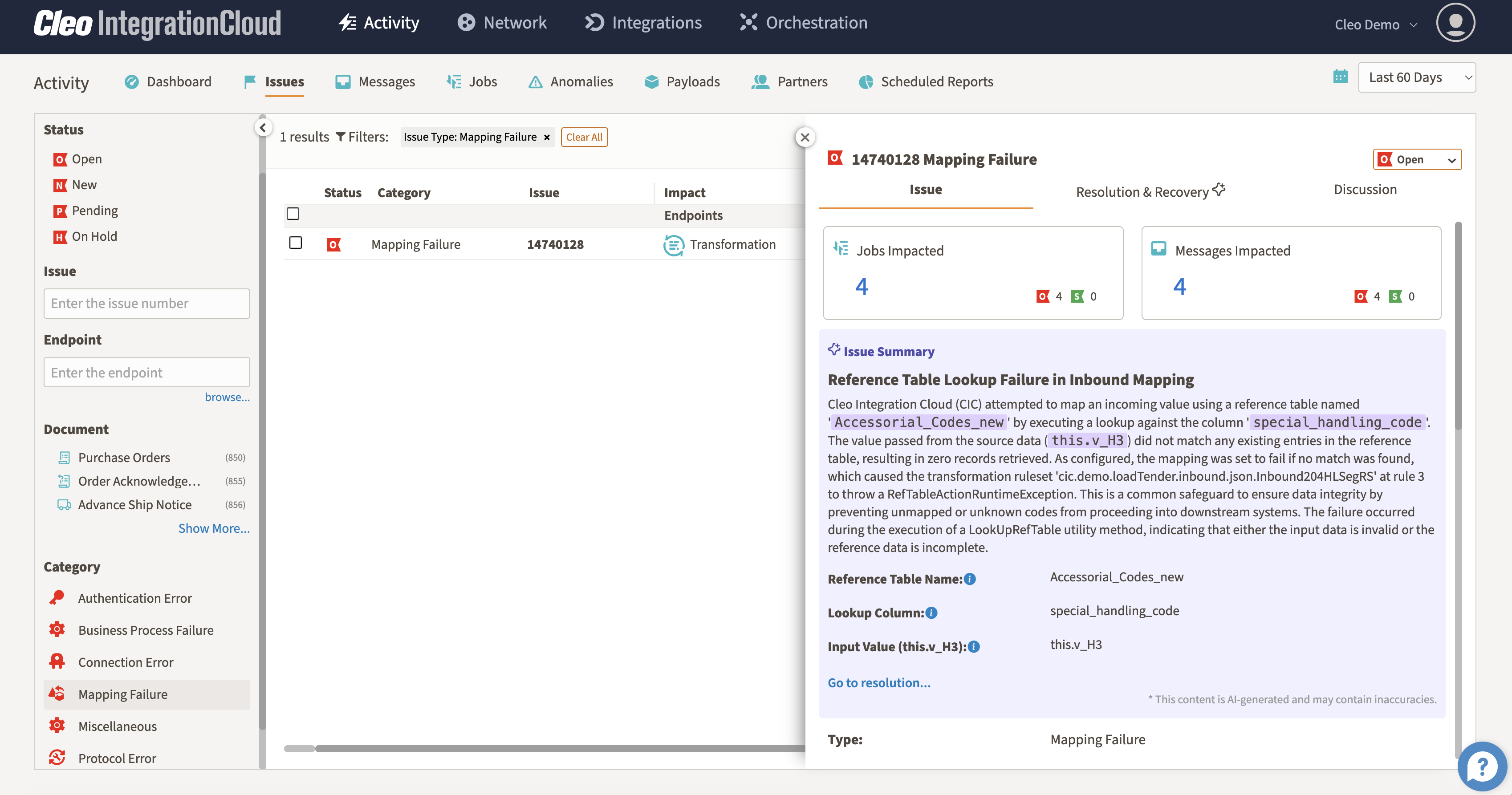
Let AI organize issues into actionable categories
Cleo AI helps teams cut through exception noise by grouping issues into meaningful buckets so users can quickly understand where attention is needed most.
- Prioritize exceptions by issue type and operational impact
- Reduce time spent manually reviewing errors
- Spot recurring patterns across partners and processes
- Route work to the right operational or technical owner
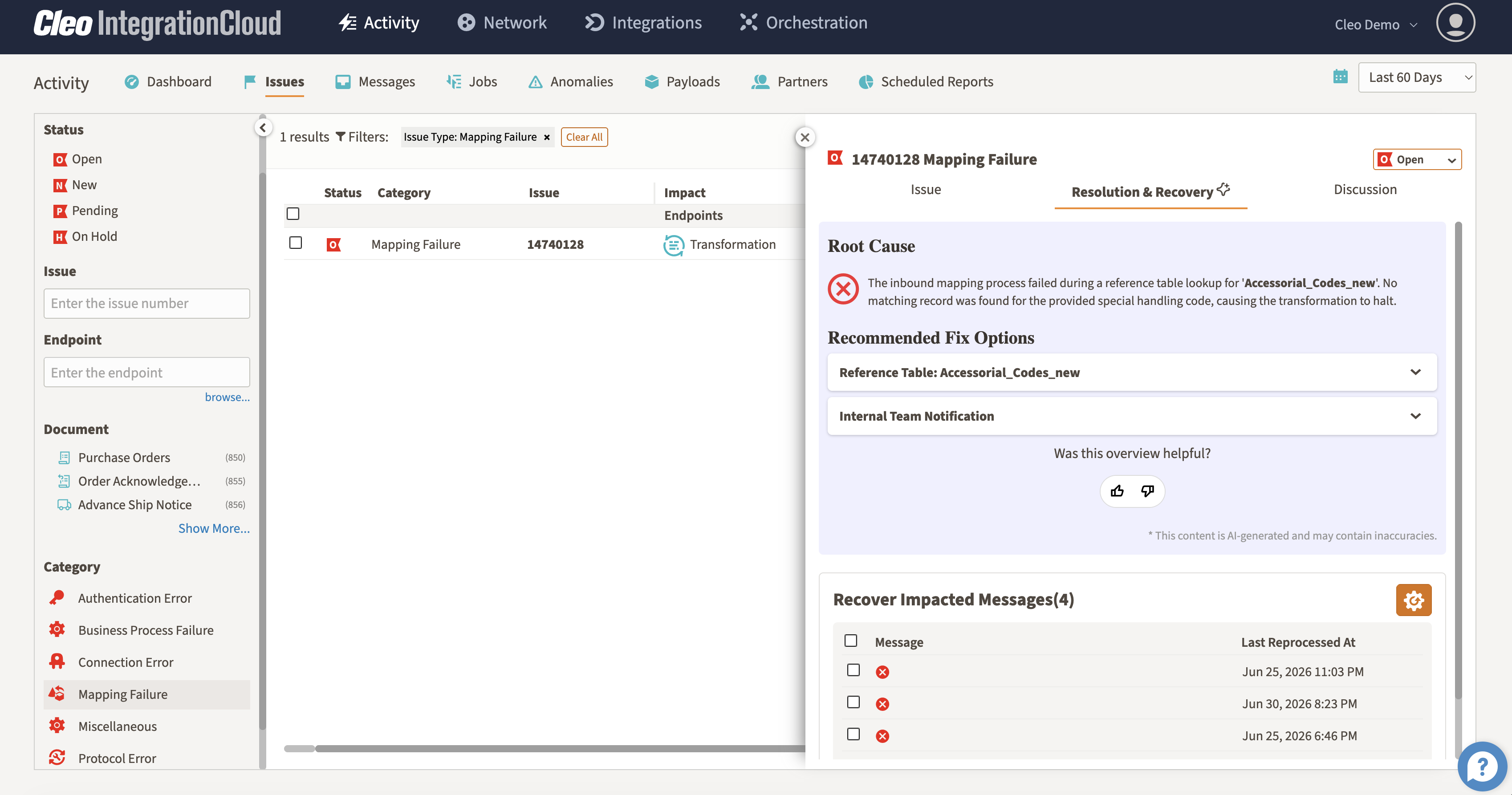
Move from issue detection to the recommended recovery path
Cleo AI provides resolution guidance and recovery context so teams can spend less time reconstructing what happened and more time restoring the business process.
- Understand likely root cause and affected workflow
- Review an AI-recommended resolution path
- Give less technical users more actionable context
- Standardize how common issues are investigated and resolved
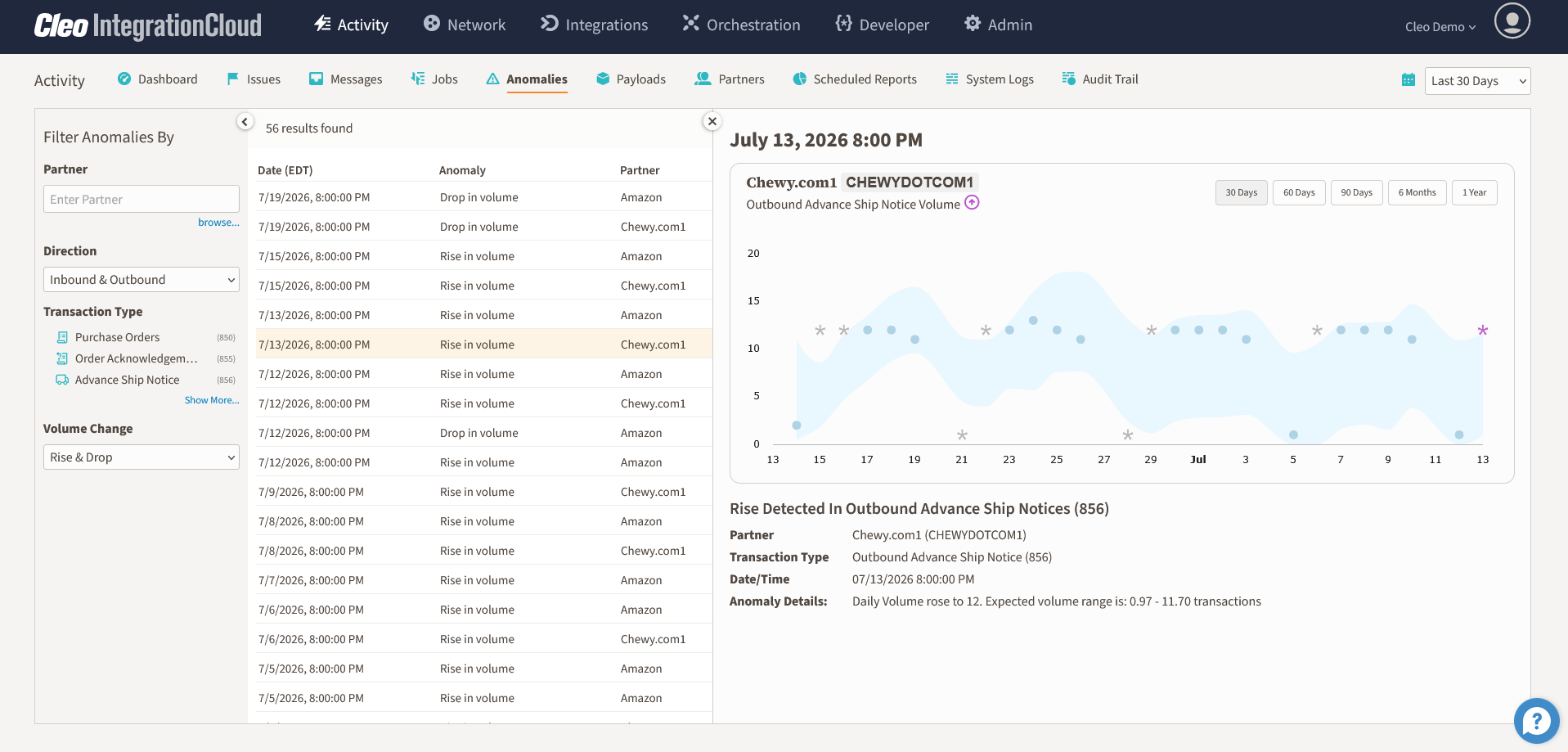
Find unusual activity before it becomes a downstream disruption
Detect unexpected spikes, drops, or changes in partner and document activity that may signal an operational problem even when no traditional threshold has been crossed.
- Compare current activity with historical behavior
- Surface unusual volume and transaction patterns
- Focus attention on changes most likely to require investigation
- Reduce dependence on static reports and reactive alerts
Ask the supply chain a question and get an answer grounded in operational data
Use natural language to explore orders, partners, exceptions, and performance without waiting for a custom report or manually assembling data from multiple systems.
- Ask questions about orders, activity, exceptions, and performance
- Get answers with business context instead of raw technical data
- Make insights accessible to operations, service, finance, and leadership
- Accelerate investigation without navigating multiple dashboards
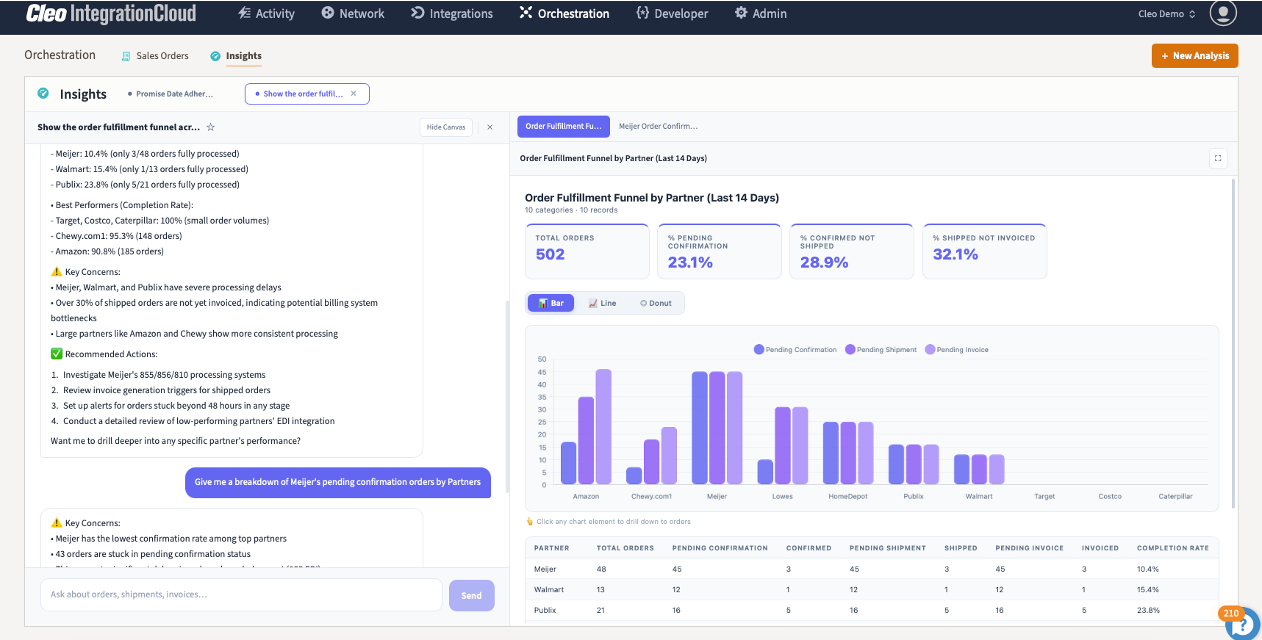
Trace operational KPIs to the partner, order, and supporting events
Investigate a fulfillment or service KPI by opening the transactions and operational milestones behind it, while keeping order and partner context together.
- Explore performance by partner, customer, location, or workflow
- Trace business outcomes to source messages and relevant events
- Investigate OTIF and fulfillment performance in context
- Reduce handoffs between business and technical teams
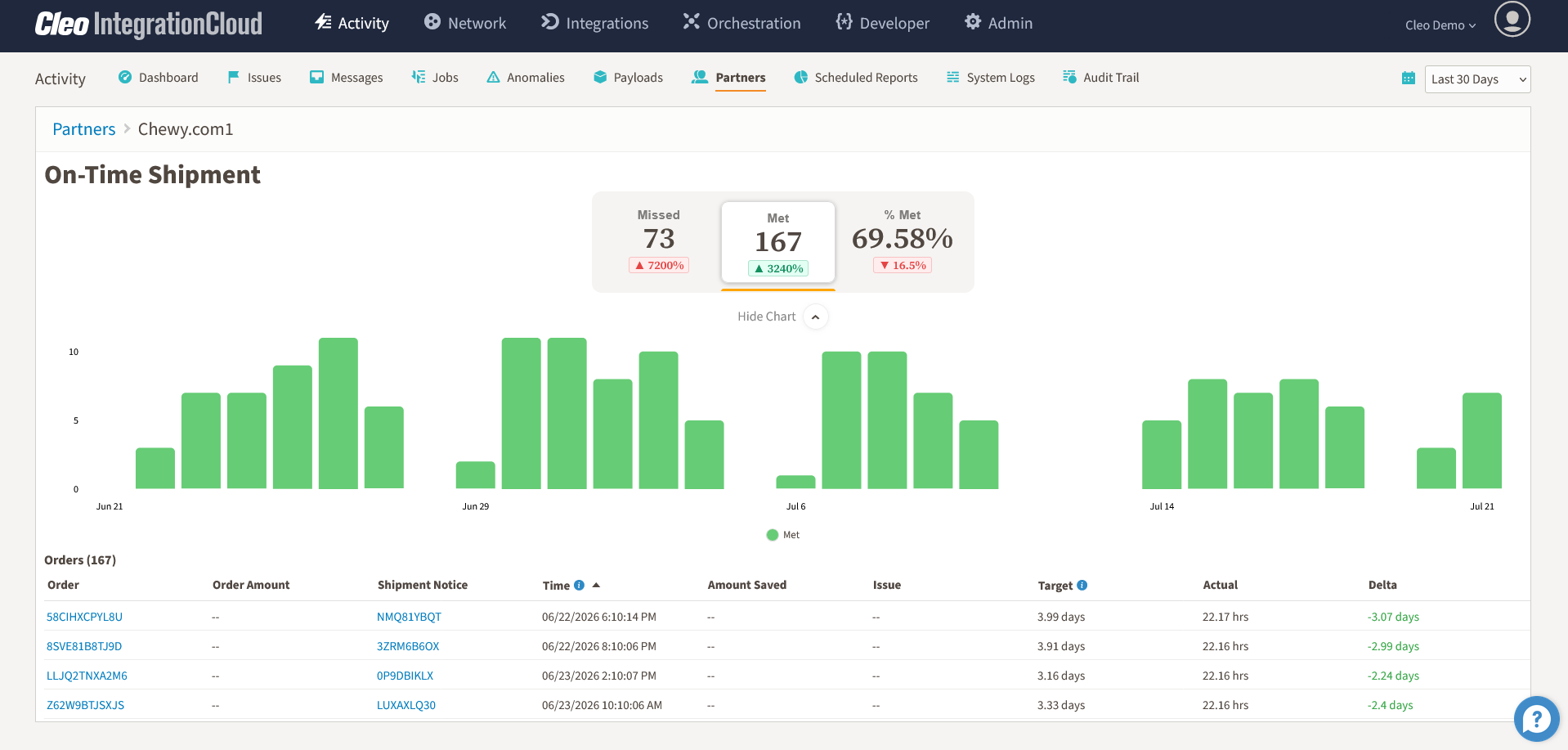
Identify fulfillment and compliance risk while there is still time to intervene
Bring chargeback risk into the same operational view used to monitor orders, documents, and partner performance so teams can act before a preventable issue becomes a deduction.
- Surface orders and workflows at risk of noncompliance
- See the operational conditions contributing to chargeback exposure
- Prioritize high-impact issues before deadlines are missed
- Connect prevention efforts to broader fulfillment visibility
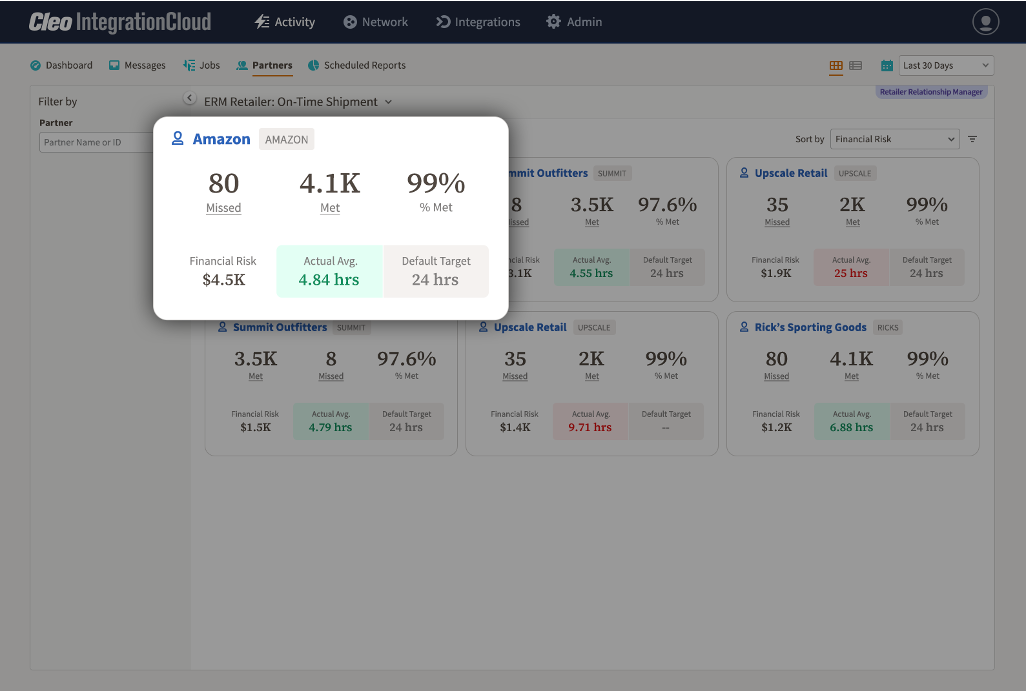
Turn partner performance into a measurable improvement program
Use shared scorecards to monitor operational performance, identify recurring compliance issues, and create more productive conversations with customers, suppliers, and internal teams.
- Compare performance across partners and business units
- Track SLA adherence, document quality, and exception trends
- Identify partners that need corrective action or support
- Measure improvement over time with a consistent scorecard
Give the whole team one truth, tailored to how each role works
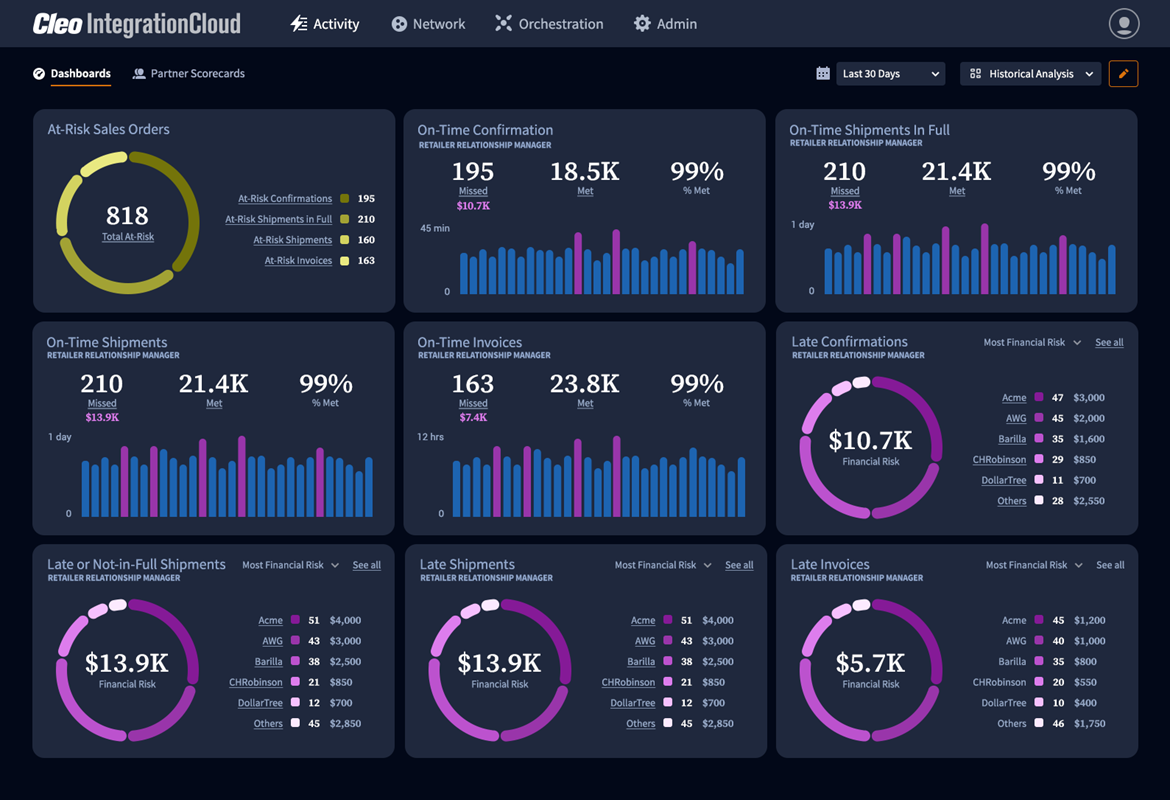
Executives, operations, customer service, finance, and technical teams can work from the same connected data while seeing the KPIs, exceptions, and actions most relevant to their responsibilities.
Performance and risk
Revenue flow, order health, ecosystem trends, service levels, and priority operational exposure.
Execution and exceptions
Orders at risk, delayed milestones, anomalies, partner issues, and next actions.
Order answers
Live order status, shipment progress, missing documents, and issue context.
Root cause and recovery
Transaction details, exception categories, technical events, and resolution paths.
How Century uses Cleo Cockpit to answer customer questions faster
Century Supply Chain Solutions describes how real-time visibility into transactions and integration health helps customer-facing teams find answers without depending on a technical ticket for every question.
Watch Century's visibility testimonial- Giving customer-facing teams transaction visibility
- Finding integration health information in one place
- Using customer-specific reports to answer questions
- Identifying and responding to issues more efficiently
Visibility and business insights FAQs
Answers for teams evaluating live operational visibility, AI-assisted insights, drilldowns, dashboards, and partner performance management.
What is Cleo Cockpit?
Cleo Cockpit is an operational experience within Cleo Integration Cloud that brings together business-process status, partner activity, transactions, exceptions, SLAs, and performance signals so teams can understand what is happening and where action is needed.
How do live order views help operations teams?
Live order views connect order milestones with the underlying partner exchanges and business documents, helping teams answer status questions, identify delays, and investigate missing steps without switching between systems.
How does intelligent exception management use AI?
Cleo AI can organize issues into meaningful categories, add operational context, and provide recommended resolution and recovery paths so teams can investigate and respond more efficiently.
How does anomaly detection differ from a threshold alert?
Instead of relying only on manually configured limits, anomaly detection compares current behavior with historical patterns to surface unusual spikes, drops, or changes that may require investigation.
Can different roles have different dashboards?
Yes. Persona-based dashboards can emphasize the metrics, partners, workflows, exceptions, and actions most relevant to executives, operations, customer service, finance, logistics, or technical users.
What does end-to-end order evidence mean?
End-to-end order evidence connects the business status of an order to its supporting partner messages, integration processing events, and available ERP or warehouse milestones. It helps teams verify what completed and find where the next handoff stopped.
How can teams investigate a missing ASN?
Start with the order and shipment references, confirm the warehouse's fulfillment event, then review ASN generation, validation, transmission, and any relevant partner response. The correct owner depends on whether the gap is in the warehouse workflow, integration processing, or partner requirements.
What can partner scorecards measure?
Partner scorecards can bring together SLA adherence, acknowledgment timing, document quality, exception rates, compliance performance, onboarding readiness, and other operational outcomes.
Turn supply chain visibility into faster, more confident action.
See how Cleo connects order milestones to supporting transactions, business-system context, and AI-powered exception guidance, so operations and IT can act on the same evidence.
What we can help you explore
- How live order views create a shared source of truth across teams
- Where AI can accelerate exception investigation and resolution
- How anomaly detection and chargeback prevention surface risk earlier
- How dashboards, drilldowns, and scorecards improve operational decisions
Talk to a Cleo visibility expert
Complete the form and a Cleo team member will follow up.