Complete Security & Governance File Exchange Solution
Move business-critical files securely across partners, applications, cloud storage, and internal systems—then go beyond basic MFT with the integration, automation, visibility, and control of Cleo Integration Cloud.
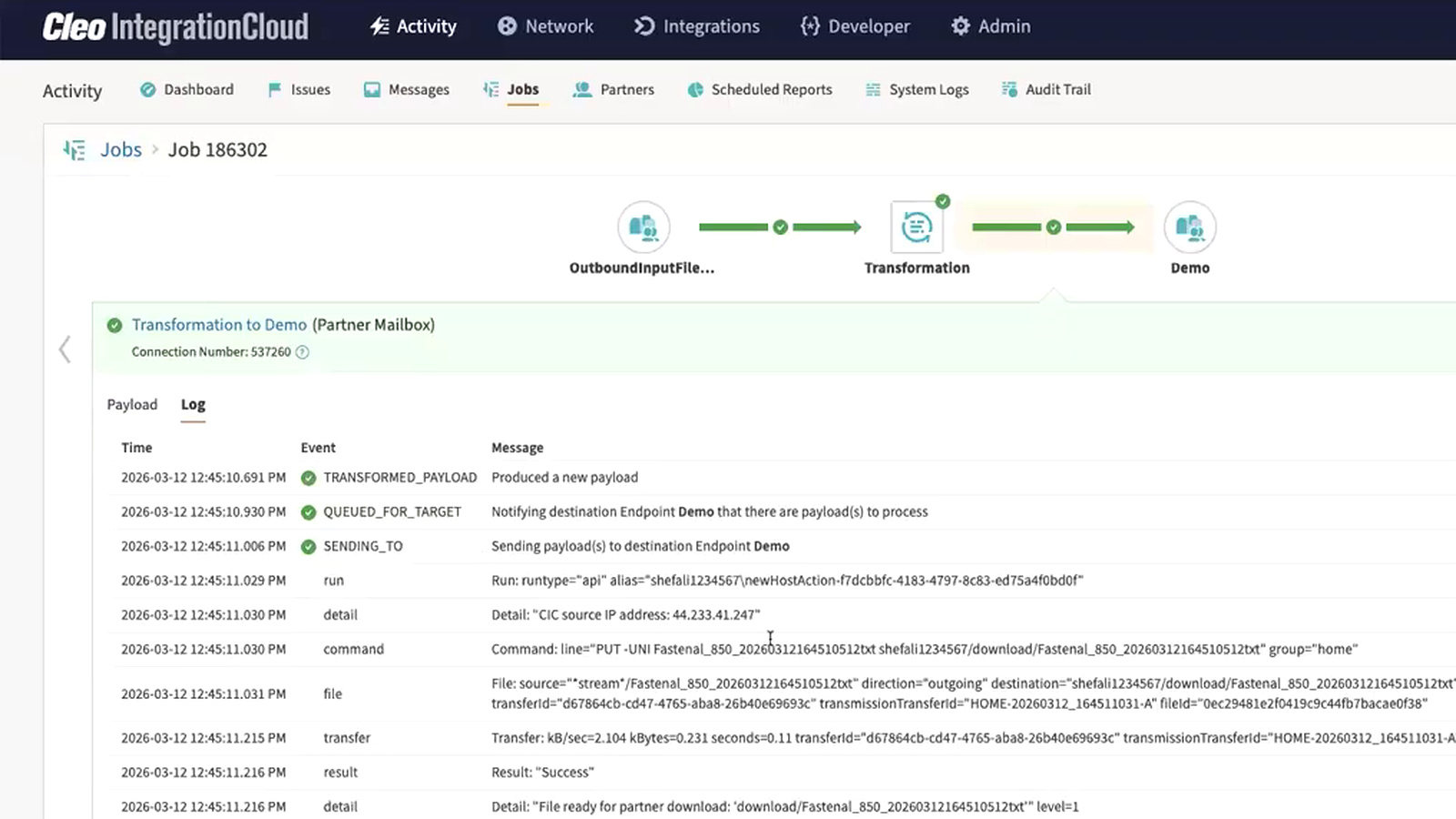
Managed File Transfer: The Operational Layer Behind Secure B2B File Exchange
Managed File Transfer (MFT) provides a governed operating layer for file-based data exchange across applications, infrastructure, internal teams, and external business partners.
Rather than treating each transfer as an isolated connection, enterprise MFT brings security, automation, partner configuration, monitoring, traceability, and exception management into a consistent operating model.
For supply chain and B2B teams, that matters because a file is rarely just a file. It may be a purchase order, shipment document, invoice, product feed, remittance file, or other business-critical payload that must arrive securely and on time. See how Cleo connects MFT with EDI and APIs.
Save time and reduce manual work
Automate recurring transfers, routing, schedules, notifications, and downstream processing instead of relying on scripts and manual handoffs.
Improve file transfer security
Protect sensitive data with secure protocols, encryption, keys and certificates, authentication, and centralized access controls.
Simplify server-to-server transfers
Standardize partner and system connectivity across SFTP, FTPS, AS2, HTTPS, and other business data exchange patterns.
Support compliance and auditability
Centralize logging, access, transfer history, and security controls to make governance and security reviews easier to manage.
MFT that connects file movement to the business process behind it.
Cleo Integration Cloud centralizes managed file transfer while connecting those files to EDI, APIs, applications, cloud services, databases, and trading partner workflows. Explore Cleo EDI & API Integration.
Centralized MFT Management
Manage secure file exchanges from a unified platform instead of maintaining disconnected transfer tools and scripts.
Multiprotocol Connectivity
Support partner and endpoint requirements with secure file transfer options including SFTP, FTPS, AS2, HTTPS, and file-based integration patterns. Explore the Cleo Trading Partner Network.
End-to-End Visibility
See transfer activity and connect file delivery to broader transaction and integration workflows for faster operational response. Learn about end-to-end visibility.
Integration & Automation
Route, transform, validate, and deliver file data into business applications and automated workflows—not just another folder. Explore API integration with Cleo.
Flexible Architecture
Connect cloud and on-premise systems and use secure access patterns for internal file systems and external trading partners.
Scalable Operations
Standardize repeatable file transfer patterns as volumes, endpoints, applications, and partner requirements grow.
Self-Service or Managed Services
Operate MFT with your own team, extend capacity with Cleo experts, or use a blended model aligned to your operational needs. See Cleo Managed Services.
Continuous Platform Improvement
Use a modern integration platform that continues to evolve across secure data movement, connectivity, automation, and operational capabilities.
Secure the transfer. Automate what happens next.
A modern MFT workflow combines secure transport with policy, routing, monitoring, and downstream integration.
Connect the source and destination
A file originates from a partner, application, cloud service, mailbox, or internal file system. Cleo connects the endpoints using the protocol and authentication method the exchange requires.
Protect and move the file
The transfer uses configured transport security, certificates or keys, endpoint verification, and other controls appropriate to the connection.
Validate, route, and act
After delivery, the workflow can route or transform data, trigger application or B2B processes, record transfer activity, and surface exceptions for resolution.
Meet partners where they are.
Cleo supports secure B2B and file-transfer patterns across common protocols and endpoint types, helping teams consolidate connectivity without forcing every partner into the same method.
Build security, governance, and reliability into every exchange.
Secure MFT should reduce operational risk without turning every new partner connection into a custom infrastructure project.
Encryption & authentication
Use secure transport plus keys, certificates, fingerprints, and endpoint authentication to protect file exchanges.
- SFTP encrypted channels
- X.509 certificates for TLS-based protocols
- OpenPGP key support for applicable endpoints
Centralized governance
Replace scattered scripts and credentials with managed configurations, standardized policies, and a clearer operational model.
- Controlled endpoint configurations
- Transfer history and audit logging
- Central visibility across exchanges
Business continuity
Design file transfer as a managed operational service with monitoring, exception visibility, repeatable patterns, and scalable connectivity.
- Automated transfer workflows
- Operational monitoring
- Exception handling and troubleshooting
Security & compliance program
Cleo publishes security and compliance information through its Trust Center, including ISO/IEC 27001 and SOC documentation.
Visit the Cleo Trust CenterWhat to expect from a robust managed file transfer solution.
Enterprise A mature MFT program coordinates connectivity, security, automation, operational visibility, and recovery across the full lifecycle of a file-based exchange.
Scheduled and event-driven transfers
Automate recurring exchanges and trigger file movement as part of larger integration workflows instead of maintaining isolated cron jobs or scripts.
- Repeatable schedules and process flows
- File-system and endpoint-driven workflows
Transfer tracking and operational history
Record transfer activity and use centralized monitoring to investigate failures, answer partner questions, and support internal governance processes.
- Message and job visibility
- Searchable operational context
Multiple protocols and endpoint types
Support the protocols partners require while connecting those exchanges to cloud storage, internal file systems, applications, and B2B processes.
- SFTP, FTPS, AS2, FTP, email, and more
- Cloud and internal system connectivity
Keys, certificates, and endpoint controls
Manage authentication and cryptographic material as part of the transfer configuration, with capabilities such as SSH keys, certificates, fingerprints, and OpenPGP for applicable endpoints.
- SSH key and certificate-based authentication
- OpenPGP support for selected endpoints
Low-friction document exchange
Not every partner runs an MFT server. CIC can support secure protocol endpoints and a web-based partner mailbox option for partners that need a simpler upload-and-download experience. See Cleo trading partner onboarding.
- Partner Mailbox / portal workflows
- Protocol-based B2B endpoints
Transform and route data after transfer
A file can be only the first step. Cleo can transform, route, and connect transferred data to downstream systems so the business process continues without another hand-built integration.
- Data transformation and routing
- Application and B2B integration
Exception visibility and issue resolution
Surface failed jobs and transfer issues so teams can investigate operational exceptions with more context than a server log or failed script provides. Explore intelligent issue resolution.
- Failed-job visibility
- Centralized troubleshooting context
Secure access to internal systems
Use Cleo connectivity patterns to bridge cloud integration services and internal infrastructure without treating every backend system as a public-facing endpoint.
- Internal file-system access patterns
- Cloud-to-ground integration flows
Where secure MFT matters most.
MFT is valuable anywhere business-critical files cross system, company, or security boundaries—especially when delivery must be automated, traceable, and connected to a downstream process.
Supply chain & manufacturing
Move operational files among suppliers, manufacturers, distributors, retailers, and logistics partners while connecting transfers to EDI and application workflows.
- Purchase orders and acknowledgments
- Inventory and product feeds
- Shipment and logistics documents
- Invoices and remittance files
Retail & consumer goods
Exchange high-volume partner files and connect retailer requirements to fulfillment, warehouse, ERP, and financial processes.
- Retailer-specific file exchanges
- Catalog and pricing updates
- Order and fulfillment data
- Trading partner onboarding
Logistics & transportation
Automate file movement among shippers, carriers, brokers, 3PLs, and internal transportation systems while maintaining operational visibility.
- Tenders and shipment status
- Rate and routing files
- Proof-of-delivery documents
- Freight billing exchanges
Financial & back-office operations
Securely move files that feed financial applications and automated business processes with traceable handoffs.
- Payment and remittance files
- Banking or treasury exchanges
- Invoice batches
- Reconciliation data
Data & application integration
Use MFT as a controlled ingress or egress layer for applications that still depend on files, then route the data into modern cloud and backend systems.
- Batch application feeds
- Database imports and exports
- Cloud storage exchanges
- Legacy modernization projects
Trading partner collaboration
Support partners with different technical capabilities using secure protocols or simpler portal-style document exchange patterns.
- SFTP or FTPS partner exchange
- AS2 document delivery
- Partner mailbox workflows
- Email-based endpoints where appropriate
Choose MFT for the operation you need to run—not just the protocol you need to support.
The strongest MFT platforms combine secure transfer with automation, visibility, integration, governance, and a path to broader B2B orchestration.
| Approach | Best suited for | Typical strengths | Typical limitations |
|---|---|---|---|
| Basic FTP / SFTP tools | Simple point-to-point transfers | Familiar protocols; straightforward connectivity | Limited centralized governance, workflow context, monitoring, and enterprise automation |
| Free / open-source file transfer | Teams with narrow requirements and engineering capacity | Low software entry cost; flexible for technical users | Operations, hardening, upgrades, monitoring, support, and governance remain your responsibility |
| Standalone MFT | Organizations primarily focused on governed file movement | Centralized security, automation, transfer management, and auditability | May require separate platforms to connect files to EDI, APIs, applications, and business processes |
| Cleo Integration Cloud | B2B and supply chain ecosystems where file transfer is part of a larger integration process | MFT plus EDI, APIs, application integration, partner connectivity, automation, and end-to-end operational visibility | Broader platform scope than teams seeking only a lightweight file-transfer utility |
SFTP is a protocol; MFT is the operating model
SFTP is a secure transfer protocol. MFT is the management layer around file exchange—adding automation, monitoring, governance, auditability, and centralized operations while often using SFTP as one supported transport.
Why organizations move beyond plain FTP
FTP is a transfer protocol and plain FTP is not encrypted. MFT provides an enterprise framework for securely managing transfers across protocols, partners, systems, policies, and workflows.
System-to-system exchange vs. user file sharing
File sharing is usually people-centric collaboration. MFT is designed for controlled, repeatable system-to-system and business-to-business exchanges that require automation, security, reliability, and auditability.
Match the operating model to your environment.
MFT architecture should reflect where your systems live, how your security team manages external connectivity, and whether you want Cleo or your own team to operate the underlying software.
Cleo Integration Cloud – Cloud Edition
Use Cleo’s cloud integration platform for B2B connectivity, application and data integration, and managed endpoint patterns including AS2, SFTP, FTPS, email, partner mailbox, and supported cloud-storage endpoints.
Cleo private-cloud data movement
For organizations that need Cleo software operated in their own environment, Cleo’s private-cloud portfolio includes Harmony, VLTrader, LexiCom, and related data-movement capabilities. Explore Cleo Harmony.
Connect cloud services to internal systems
Use Cleo Integration Cloud with secure access patterns to reach file systems and backend infrastructure while orchestrating partner-facing activity in the cloud.
Architecture matters: Cleo product capabilities differ by Cloud Edition, Private Cloud Edition, endpoint type, and licensing. Validate your required protocols, authentication methods, throughput, and topology during solution design.
How to evaluate managed file transfer software.
A protocol checklist is only the start. Evaluate how the platform will operate after the first connection goes live—and whether it can support the broader integration process around the file.
Security & governance
- Which protocols, ciphers, keys, and certificates are supported?
- How are credentials and certificate lifecycles managed?
- What audit history and access controls are available?
Automation & reliability
- Can recurring transfers and downstream actions be automated?
- How are failed jobs, retries, and exceptions surfaced?
- Can operations teams troubleshoot without reading raw server logs?
Connectivity & ecosystem
- Can partners use SFTP, FTPS, AS2, portals, and other required methods?
- Can it reach internal file systems and cloud storage?
- How quickly can new trading partners be onboarded?
Integration & business context
- Can file payloads be transformed and routed into applications?
- Can the same platform support EDI and API integrations?
- Can teams see the business transaction behind the transfer?
Scale & operating model
- How does the solution handle growth in partners, files, and transactions?
- Is cloud, private-cloud, or hybrid deployment required?
- Do you need self-service, managed services, or both?
Vendor & lifecycle
- How are security updates and product enhancements delivered?
- What implementation and ongoing support are available?
- Can the platform expand beyond MFT as integration needs change?
A practical path from fragile scripts to managed file transfer.
File-transfer modernization can be phased. Begin with the connections that carry the most operational risk, define reusable patterns, and move partners in controlled waves without forcing a big-bang cutover.
Inventory
Document scripts, endpoints, schedules, protocols, credentials, file patterns, partner owners, and downstream dependencies.
Prioritize
Start with high-risk, high-volume, frequently failing, or business-critical transfers where central visibility provides immediate value.
Standardize
Create reusable connection, security, naming, monitoring, and exception-handling patterns rather than re-creating every legacy script one-for-one.
Orchestrate
Connect the transferred file to its downstream application, EDI, API, or business process so modernization removes integration silos instead of relocating them.
Turn secure file transfer into supply chain orchestration.
Cleo Integration Cloud is designed for organizations that need more than moving a payload from point A to point B. Connect file transfer to the systems, partners, transactions, and business outcomes that depend on it.
Connect files to EDI
Use file-based exchanges as part of structured B2B document flows and trading partner processes.
Connect files to applications
Move data between file endpoints and business systems, databases, cloud applications, and integration workflows.
Connect transfers to visibility
Give operations teams context to understand whether a business transaction—not just a file—completed successfully.
Questions to ask before choosing an MFT solution.
What is managed file transfer software?
Managed file transfer software centralizes and governs secure file exchanges between systems, applications, people, and external partners. It typically adds automation, monitoring, security controls, logging, and operational management around protocols such as SFTP and FTPS.
Is MFT more secure than FTP?
MFT is a broader management and security framework, while FTP is a protocol. Plain FTP does not encrypt traffic. An MFT platform can use secure protocols such as SFTP or FTPS and add centralized authentication, keys and certificates, policies, logging, and monitoring.
What is the difference between MFT and SFTP?
SFTP is a secure protocol for transferring files over SSH. MFT software can use SFTP while adding scheduling, automation, partner management, governance, visibility, audit trails, alerts, and integration with other systems.
Which secure file transfer protocols does Cleo support?
Cleo supports multiple B2B and file-transfer connection patterns, including SFTP, FTPS, AS2, HTTPS, partner mailboxes, file systems, and other endpoint options. Exact availability can depend on the Cleo product, edition, and connector licensing.
Can Cleo connect MFT workflows to internal applications?
Yes. Cleo Integration Cloud supports file-based integration with backend systems and can also connect to databases and supported cloud applications. This makes it possible to use a secure file exchange as one step in a broader automated integration flow.
Does Cleo support cloud and on-premise file transfer use cases?
Yes. Cleo provides options for connecting cloud and internal systems, including file-system endpoints and secure access patterns for backend connectivity. Cleo also offers private-cloud data movement capabilities through products in the Cleo portfolio.
What should I look for in an enterprise MFT solution?
Evaluate protocol coverage, encryption and authentication, centralized governance, auditability, automation, monitoring, exception handling, partner onboarding, backend integration, deployment requirements, scalability, operational support, and how easily file transfers connect to the business processes they serve.
Why use Cleo Integration Cloud for MFT?
Cleo Integration Cloud combines managed file transfer with broader B2B integration capabilities. That lets teams manage secure file movement while also connecting files to EDI, APIs, applications, trading partners, and end-to-end operational workflows.
Who needs managed file transfer?
MFT is especially useful for organizations that exchange sensitive or business-critical files at scale, rely on recurring system-to-system transfers, work with many external partners, need stronger auditability, or want to replace fragile FTP scripts with centrally managed automation.
Can MFT replace custom FTP and SFTP scripts?
Often, yes. MFT can centralize connection settings, schedules, authentication, logging, monitoring, and workflow automation that would otherwise be distributed across scripts. Migration should account for every script’s business dependencies, not just the transfer command itself.
Does MFT support automated file processing?
Yes. Modern MFT platforms can automate recurring transfers and trigger follow-on processing. In Cleo Integration Cloud, file movement can also be connected to transformation, routing, B2B integration, and application workflows.
How does MFT help with auditability?
MFT centralizes transfer activity and operational history so teams can investigate what was sent or received, identify failed jobs, and maintain a more consistent record of file exchange than scattered scripts and individual user tools typically provide.
Can smaller trading partners use MFT without running an SFTP server?
Yes. Depending on the solution, partners can use alternatives such as secure web portals or mailboxes. Cleo Integration Cloud supports a web-based Cleo Portal / Partner Mailbox option for lower-technology trading partners to upload and download documents.
What is MFT automation?
MFT automation applies schedules, triggers, routing rules, and workflow logic to file transfers so files move and are processed without repeated manual intervention. Effective automation also includes monitoring and exception handling when a transfer or downstream step fails.
What is the difference between MFT and an integration platform?
MFT focuses on secure, governed file exchange. An integration platform connects data across applications, APIs, EDI, databases, partners, and other systems. Cleo Integration Cloud combines file-based connectivity with broader B2B, application, and data integration so file transfers can participate in end-to-end business processes.
How should I compare MFT vendors?
Compare required protocols and endpoint types, security and certificate management, auditability, automation, failure handling, deployment architecture, partner onboarding, backend and cloud integration, scalability, implementation effort, support, and the platform’s ability to expand as your integration requirements grow.
Modernize secure file transfer without creating another integration silo.
See how Cleo Integration Cloud can centralize MFT, connect your trading partners and systems, and automate the business processes behind every critical file exchange.