EDI 834: Benefit Enrollment and Maintenance
Read the guide below to learn about the EDI 834.
If you need to send or receive EDI 834s, contact our team of EDI experts today.


What is an EDI 834?
EDI 834 is the Benefit Enrollment and Maintenance transaction set, used primarily in the healthcare and insurance industries. It allows employers, government agencies, and health plan sponsors to electronically enroll members in a health insurance plan or make changes to their enrollment status.
EDI 834 follows the ANSI X12 standard and is a requirement under the HIPAA mandate for transmitting enrollment information securely.
What are the Essential Components of EDI 834?
This transaction communicates detailed benefits enrollment information and typically includes:
- Subscriber and dependent demographic data
- Enrollment action (new enrollment, change, or termination)
- Benefit plan details and coverage levels
- Effective dates of coverage
- Employment and eligibility information
- Premium amounts and contribution data
How do I Use EDI 834?
An employer or benefits administrator sends an EDI 834 to an insurance provider or third-party administrator to enroll employees in coverage, update member data, or terminate plans. These transactions are often generated from an HR or payroll system on a scheduled basis (e.g., weekly or monthly).
The recipient processes the EDI 834 into their system and may send back an EDI 999 or 277CA to confirm acceptance or report errors.

What are the Benefits of EDI 834?
EDI 834 eliminates the need for paper forms, spreadsheets, or manual data entry—streamlining enrollment and reducing errors. Employers can manage benefits data more efficiently, while health plans receive accurate and timely updates to coverage.
It also helps ensure compliance with HIPAA and Affordable Care Act (ACA) requirements by securing data and maintaining audit-ready enrollment records. Furthermore, what will you gain from leveraging Cleo's expertise and services for your EDI?
With Cleo's EDI solutions
vs
Without Cleo's EDI solutions
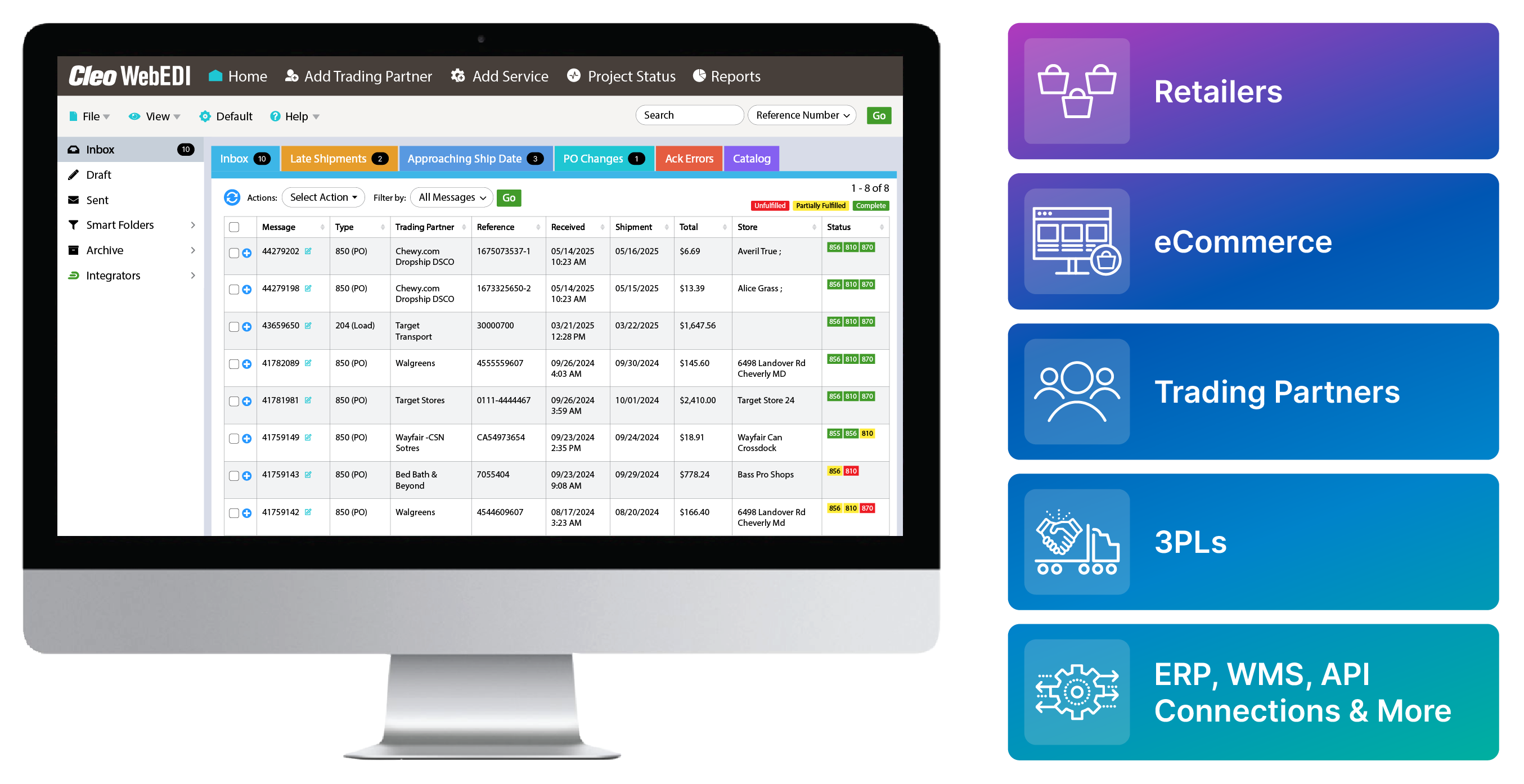
Notifications: Receive real-time alerts for inbound orders
Missed or delayed orders due to lack of real-time alerts
Intuitive Webforms: Auto-fill response docs to eliminate manual data entry
Time-consuming manual data entry that introduces frequent errors
Smart Folders: Organize documents dynamically based on custom rules
Disorganized document storage and difficult retrieval during audits or fulfillment
Document Fulfillment Dashboard: Monitor order statuses live—unfulfilled, partial, or complete
Limited visibility into which orders are unfulfilled, partially shipped, or completed
Label & Document Printing: Instantly generate shipping labels and compliance docs
Manual label generation that slows down shipping and risks compliance violations
Catalog Management System: Pair with Auto-Pack ASN for rapid order response
Delays in ASN creation due to disconnected catalog systems
Batch Processing: Process and print multiple documents and labels at once
Inefficiency when processing documents or labels one-by-one in high-volume scenarios
Scalable Portal: Seamlessly integrate with any ERP, WMS, or accounting system
Disjointed systems requiring duplicate data entry across ERP, WMS, or accounting platforms
Keep a list of all X12 EDI transaction sets at hand.
Access a free EDI Transaction Set Guide
More EDI Resources
Explore additional EDI resources to deepen your understanding and enhance your proficiency in Electronic Data Interchange.
-
 3 Ways to Become EDI Compliant & Eliminate EDI Chargebacks
Many major companies have requirements for EDI trading partner setup and maintenance, both of which are important in keeping compliant...
Read the Blog
-
 EDI Visibility & Business Insights
23% of companies say visibility is one of their biggest integration challenges. Let's analyze this issue and unleash a powerful solution...
Read More
-
 EDI Integration in Action
Explore a curated list of videos to help you understand the unprecedented value of EDI integration...
Start Watching