Launch trading partners faster with network-assisted onboarding
Cleo helps teams move from partner request to production-ready workflows faster by using the Cleo Network, Trading Partner Library, reusable transaction assets, AI-assisted setup, and real-time onboarding visibility.
Start with the partner connection you need today — EDI, Web EDI, API, MFT, or application integration — and scale into AI-native supply chain orchestration as your ecosystem grows.
Turn partner setup into a repeatable, network-assisted motion
Trading partner onboarding often slows down when teams have to research partner identifiers, rebuild transaction sets, gather sample files, and configure maps manually for every new relationship.
Cleo helps reduce that duplicated work by surfacing known partner profiles and onboarding assets inside the Cleo Network, so teams can start with more context and move faster toward production.
- Search for existing partner profiles instead of starting with a blank setup
- Select the relevant partner, division, or ISA/GS pairing when available
- Bring known transaction types and onboarding assets into the setup flow
- Use sample files to help identify partner details when a new profile is needed
- Move from setup into testing, monitoring, and exception management
See how Cleo simplifies trading partner onboarding
Watch the video directly on the page to see how Cleo helps teams create a faster, more repeatable path from a new partner request to connected, ready-to-test workflows.
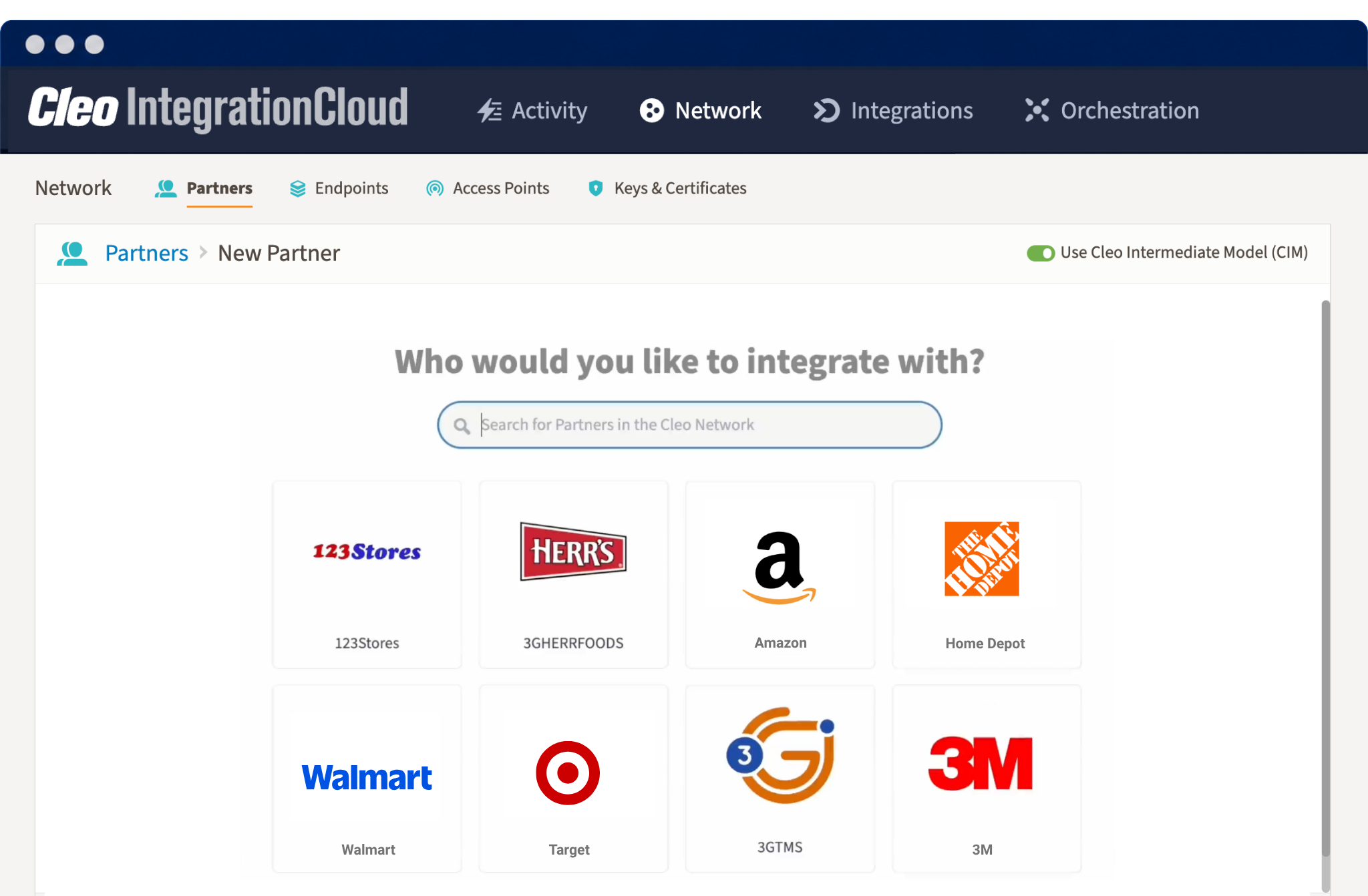
Find the right partner profile faster
Search known partner profiles in the Cleo Network and start onboarding with reusable partner context instead of a blank setup. Teams can quickly identify the partner they need, then move into profile details, divisions, and transaction selection.
- Search partner records from one guided onboarding flow
- Start from known partner information when available
- Reduce repeated discovery, setup, and configuration work
Bring known transaction details into the onboarding flow
For in-network partners, Cleo can help teams start with available identifiers, divisions, document types, directions, EDI versions, and transaction assets. That gives integration teams a more complete starting point and helps reduce repetitive setup work.
- Review available partner divisions and ISA/GS pairings
- Select the transaction types needed for the relationship
- Use known maps and transaction assets where available
- Move quickly into testing and validation before go-live
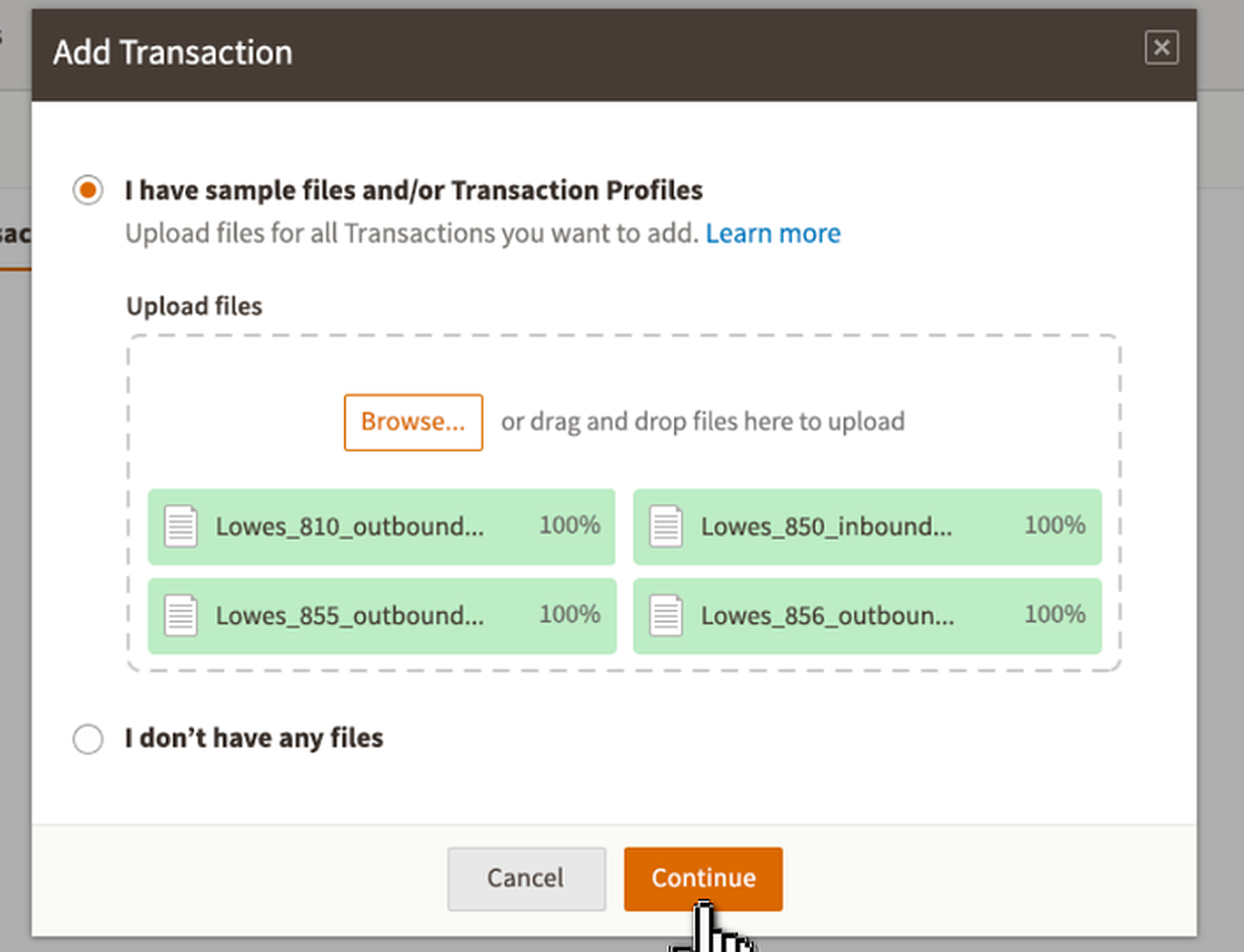
Move partners from request to production faster
Cleo supports both network-assisted onboarding for known partners and guided setup for new partner relationships that need to be created from files or requirements.
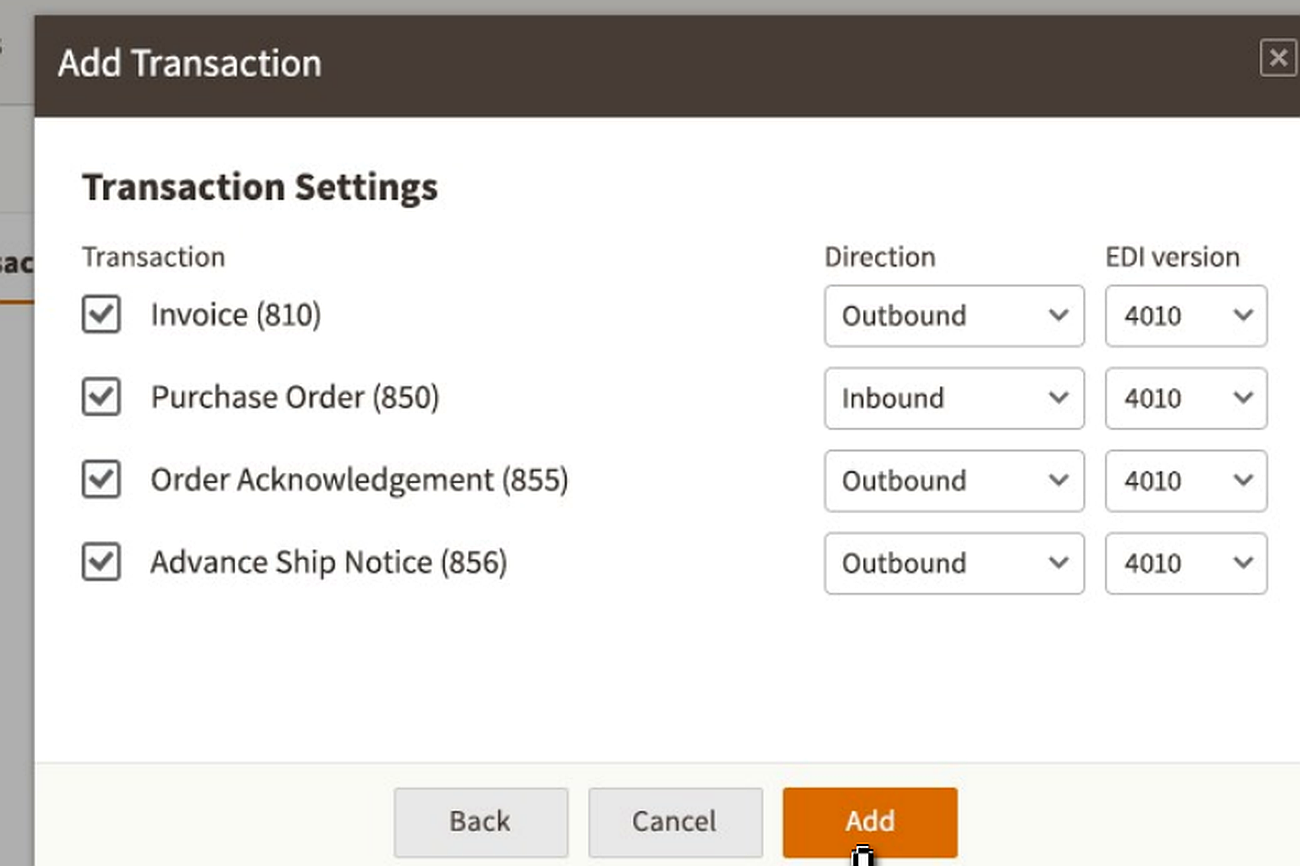
Use sample files to move unknown partners forward
When partner details are incomplete, teams can upload sample files or transaction profiles to keep onboarding moving.
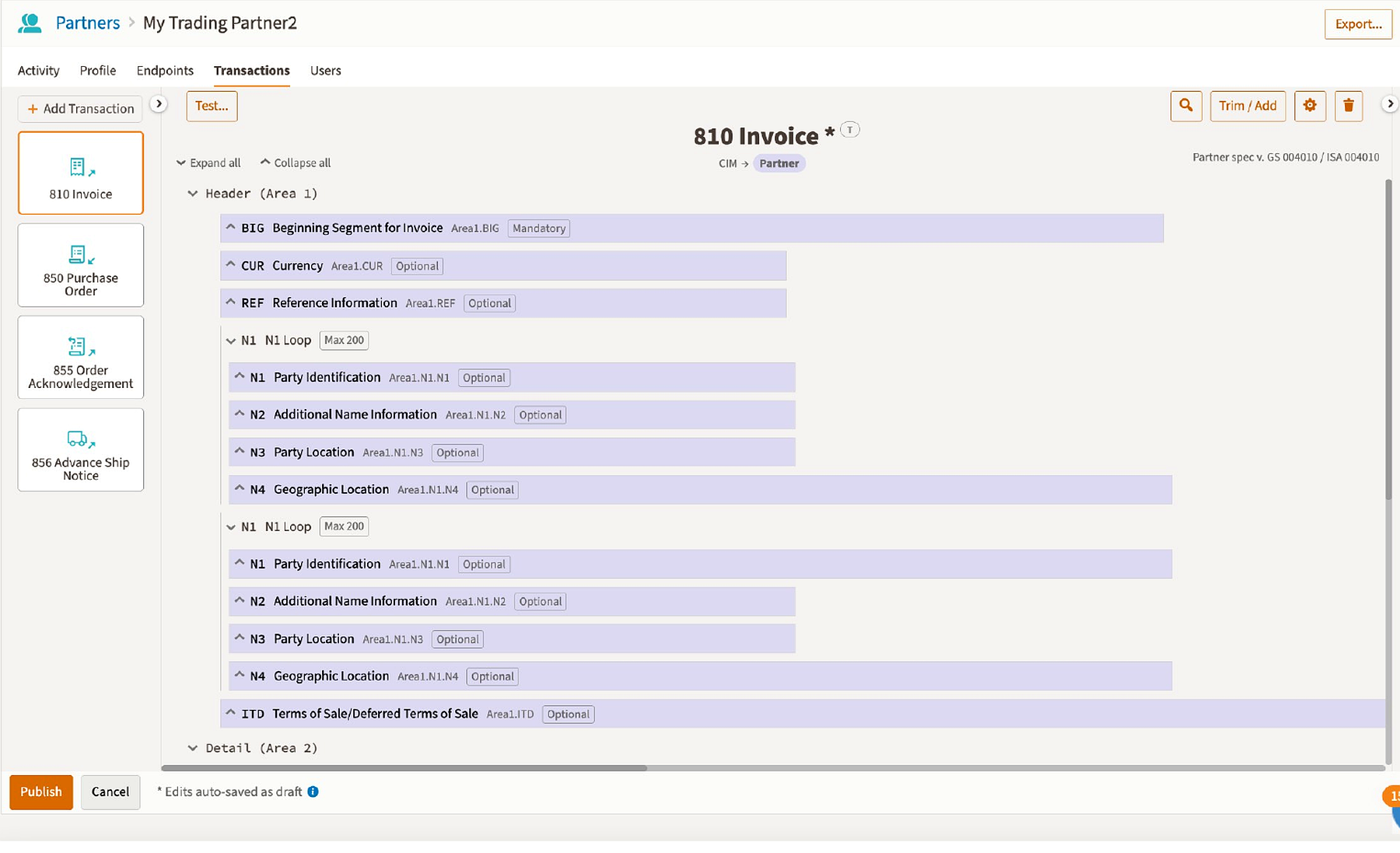
Confirm transaction direction and EDI version
Guided settings help teams validate the right transaction behavior before adding workflows.
Use AI-assisted guidance when partner details are incomplete
Not every onboarding project starts with a complete partner profile. When a partner is new or the team does not have all required identifiers, Cleo can use uploaded sample files and guided setup flows to help identify the right partner information and accelerate configuration.
After go-live, Cleo AI also helps teams detect abnormal transaction patterns, classify issues, and generate guided resolution paths when exceptions appear.
Support every partner, regardless of technical maturity
Some partners can be found in the network. Others need guided setup from files, requirements, or a simpler portal-based experience. Cleo gives teams options to connect different partner types without fragmenting the onboarding strategy.
EDI partners
Onboard partners that exchange standardized documents such as POs, invoices, ASNs, acknowledgments, and remittance.
Web EDI partners
Give low-volume or less technical partners a browser-based way to participate in EDI workflows.
API partners
Support modern application-to-application and partner workflows with API connectivity.
File-based partners
Support MFT and secure file-based exchange across partners, applications, and operational systems.
Go from partner profile to testable transaction flows
Once partner details and transactions are selected, Cleo helps teams move into mapped workflows, validation, and testing so onboarding does not stall between configuration and production readiness.
- Connect transaction setup to mapping and testing steps
- Validate partner-specific requirements before go-live
- Monitor transaction status and exceptions after launch
- Use onboarding quality to improve partner performance over time

Onboarding workflows Cleo helps accelerate
Retail and distributor onboarding
Connect retailers, distributors, marketplaces, and 3PLs while supporting partner-specific document requirements.
Supplier onboarding
Standardize how suppliers exchange required documents and move into production-ready workflows.
Logistics partner onboarding
Connect carriers, warehouses, 3PLs, and transportation workflows across EDI, API, and file exchange.
ERP-connected onboarding
Move partner transactions into ERP, WMS, TMS, accounting, shipping, marketplace, and cloud applications.
Migration and modernization
Replace brittle partner onboarding processes with more repeatable workflows and broader platform visibility.
Onboarding visibility
Give teams clearer visibility into partner readiness, transaction status, and post-launch exception patterns.
Onboard partners in the way that fits their requirements
| Partner scenario | Best-fit Cleo option | What it helps with |
|---|---|---|
| Partner exists in the Cleo Network | Trading Partner Library | Search known partner profiles and start from available profile, division, transaction, and map assets. |
| Partner is new or identifiers are unknown | Guided file-based setup | Upload sample files or transaction profiles to help identify details and create a new partner workflow. |
| Partner needs to meet EDI requirements quickly | Modern EDI | Support standardized document exchange, validation, and transaction monitoring. |
| Lower-volume partner is not ready for full integration | Web EDI | Give partners a browser-based way to participate in EDI workflows. |
| Partner ecosystem is growing in complexity | Supply chain orchestration | Coordinate EDI, API, MFT, applications, exceptions, and partner performance in one connected flow. |
Why teams choose Cleo for trading partner onboarding
Trading partner onboarding FAQs
What is trading partner onboarding?
Trading partner onboarding is the process of connecting customers, suppliers, retailers, distributors, logistics providers, marketplaces, and other partners so they can exchange documents and transactions through EDI, API, MFT, Web EDI, or application workflows.
How does Cleo help teams onboard partners faster?
Cleo helps teams standardize partner intake, search the Trading Partner Library for known partner profiles, reuse available onboarding assets, support validation and testing, and monitor partner readiness and transaction flow after go-live.
What is the Cleo Trading Partner Library?
The Cleo Trading Partner Library is part of the Cleo Network experience. It helps teams search for known trading partners and use available partner profile, division, transaction, and onboarding details to reduce manual setup work.
What happens when a partner is not in the library?
If a partner is new or the right division is not available, Cleo can support guided setup with sample files or transaction profiles to help identify partner details and create the required transaction workflows.
Can Cleo support partners that are not ready for direct EDI integration?
Yes. Cleo can support Web EDI options for partners that need a browser-based way to participate in EDI workflows while still giving the business a path to deeper integration over time.
What happens after partners go live?
Cleo helps teams monitor transaction status, document flow, exceptions, and partner performance so onboarding becomes part of a broader operational visibility and supply chain orchestration strategy.
Launch partners faster. Keep transactions moving.
Tell us about the partners, documents, systems, and workflows you need to onboard. We’ll help you identify the right path across EDI, Web EDI, API, MFT, Cleo AI, and supply chain orchestration.
What we can help you map out
- Which onboarding path fits your partner ecosystem
- How to reduce manual setup, mapping, and validation work
- Where Cleo AI and exception visibility can help after go-live
- How to scale onboarding into broader supply chain orchestration
Talk to a trading partner onboarding expert
Complete the form and a Cleo team member will follow up.