From freight EDI activity to business action
Cleo is a supply chain orchestration software company. Its AI-powered Cleo Integration Cloud brings API, EDI, managed file transfer, non-EDI integrations, application connectivity, and managed services together for revenue-critical business processes. Cleo Freight Order Execution applies that connected data to the carrier tender-to-invoice lifecycle.
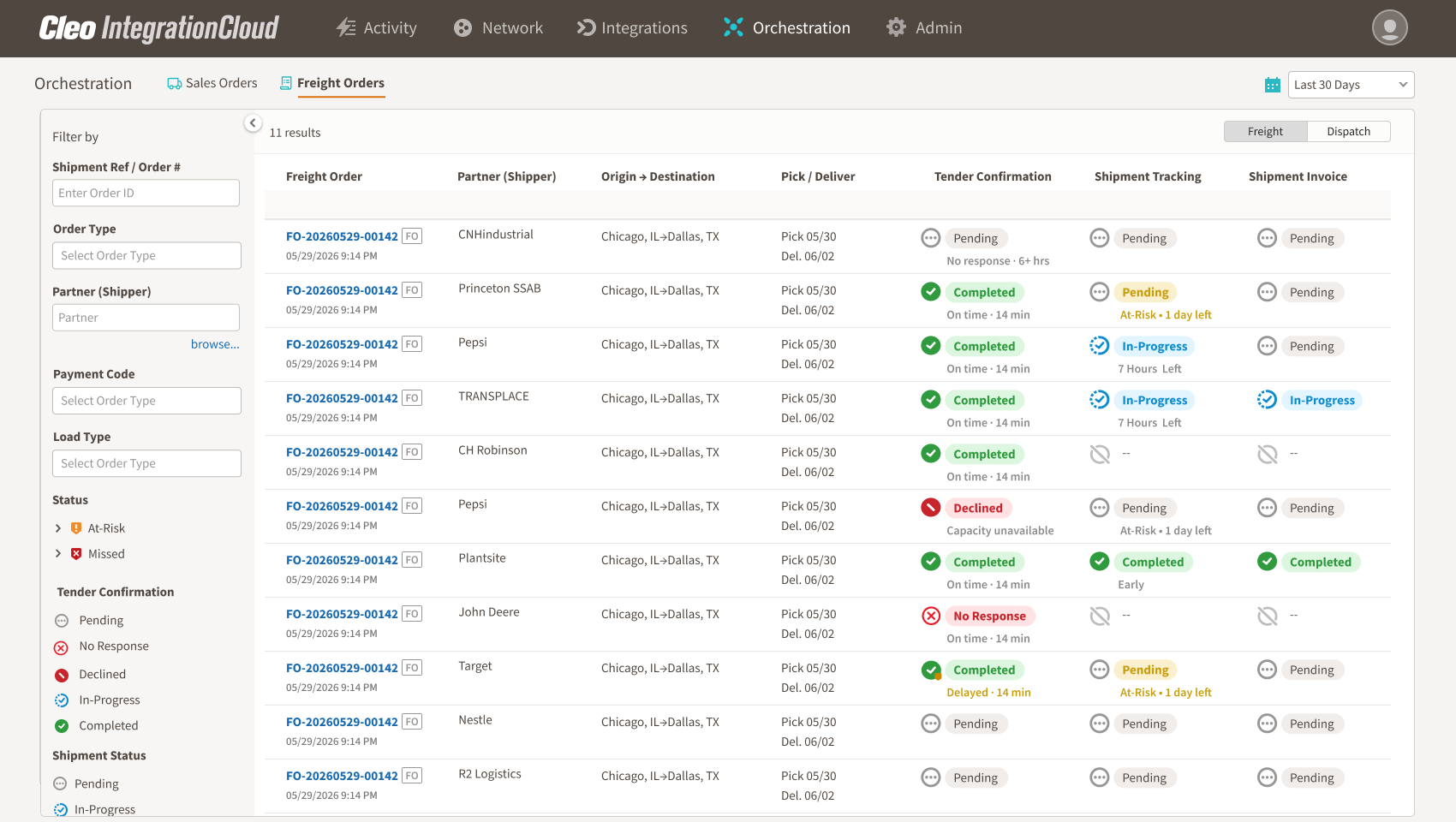
Instead of presenting every EDI message as a separate technical event, Freight Order Execution organizes tender, response, shipment-status, delivery, and invoice activity around the freight order. Carrier operations, customer service, billing, and integration teams gain shared context while the TMS remains the operational system of record.
Follow delivered freight orders through the expected EDI 210 milestone so billing teams can investigate missing, delayed, rejected, or unmatched invoices.
Surface freight orders that need attention, including unanswered tenders, missing shipment milestones, at-risk stops, and delivered loads awaiting an invoice.
Use EDI 204, 990, 214, and 210 activity already flowing through Cleo Integration Cloud to create a connected, business-friendly operating view.
What “delivered but not invoiced” means
A delivered-but-not-invoiced load has reached a qualifying delivery milestone, but the carrier has not detected the expected billing event within an agreed period. In an EDI-driven motor-carrier workflow, delivery status commonly appears in an EDI 214 Transportation Carrier Shipment Status message. The freight invoice is commonly exchanged as an EDI 210 Motor Carrier Freight Details and Invoice.
The important word is corresponding. A carrier should not merely compare the total number of delivery messages with the total number of invoices. It should connect events at the freight-order level using the identifiers and partner context available in its implementation.
Why delivered loads fall between operations and billing
Delivery and billing are monitored in separate systems
Dispatch may work in the TMS, customer service may follow status updates, billing may use an ERP or accounting queue, and IT may watch the EDI platform. Each system can be working as designed while nobody sees the entire tender-to-invoice journey.
A delivery event does not trigger a billing review
Delivery is an operational milestone. Invoicing is a financial milestone. If the handoff between them depends on a spreadsheet, email, batch report, or individual memory, a completed load can wait unnoticed.
The invoice exists but cannot be matched
Reference mismatches, partner-specific requirements, timing differences, rejected transactions, and downstream processing errors can all make an invoice appear absent from the freight-order view. This is why the workflow must support investigation, not simply label every gap as the same problem.
Static reports create noise
A report of all open or completed loads forces billing teams to search for exceptions manually. The higher the volume, the more likely urgent items are buried among healthy freight orders.
A six-step workflow for finding the gap
Step 1: Define the qualifying delivery milestone
Agree on the status event that makes a freight order eligible for billing review. The exact status can vary by customer, mode, and implementation guide. Document the event, the source system, and any exclusions.
Step 2: Establish the expected invoice window
Set the period within which an invoice should normally appear after delivery. Avoid imposing one universal threshold if customers have different billing requirements. The objective is to identify an exception relative to the correct operating context.
Step 3: Connect delivery and invoice events to one freight order
Build a business-level record that links the tender, response, shipment status, delivery, and invoice. For EDI-based carrier operations, that often means connecting the EDI 204, 990, 214, and 210 rather than inspecting each document in isolation.
Step 4: Filter to unmatched orders
Once the records are connected, identify delivered freight orders without the expected invoice event. Exclude cancelled, duplicated, test, and otherwise ineligible activity so the queue represents work that deserves attention.
Step 5: Prioritize by business risk
A useful queue should elevate more than the oldest load. Consider customer billing deadlines, strategic-account importance, invoice value when available, days since delivery, partner-specific requirements, and whether the underlying transactions show another exception.
Step 6: Give every exception an owner
Route the exception to the team that can resolve it. Billing may create or release the invoice. Customer service may obtain missing information. Operations may verify the delivery milestone. IT may investigate whether the invoice was transmitted, rejected, or failed downstream.
What the exception view should show
A useful delivered-but-not-invoiced view should provide enough context to act without forcing users to reconstruct the load from several systems.
- Freight-order and partner identifiers
- Origin, destination, and relevant lane or stop information
- Planned and actual delivery timing
- The delivery milestone and its source transaction
- Expected invoice date or billing window
- Whether an EDI 210 has been detected
- Days since delivery and proximity to a customer deadline
- Related transaction history and current owner
Metrics that reveal whether the process is improving
Measure the process at the freight-order level. Useful indicators include the number and value of delivered orders awaiting an invoice, median time from delivery to invoice, percentage invoiced within the expected window, age of the oldest exception, and resolution time by cause or team.
Trend the measures by shipper or trading partner. A portfolio-level average can hide a recurring problem with one customer workflow or implementation.
Where Freight Order Execution fits
Cleo Freight Order Execution connects the EDI transactions already moving through Cleo Integration Cloud into an operating view for carrier teams. It follows tender, response, shipment status, delivery, and invoice milestones and surfaces freight orders that need attention—including delivered loads for which the corresponding EDI 210 has not been detected within the expected billing period.
The product is designed to complement an established TMS. Its role is to add connected business context, proactive signals, and an exception-focused workflow across operations, customer service, billing, and integration teams.
Frequently asked questions
Can a TMS report identify every unbilled load?
A TMS may contain much of the necessary operational data, but the answer depends on how delivery, billing, partner, and EDI events are connected. If those signals live in separate systems or queues, the report may not reveal the entire transaction journey.
Does the absence of an EDI 210 prove an invoice was never created?
No. It shows that the expected invoice transaction has not been detected in the relevant flow. The invoice may be pending, held, rejected, transmitted through another channel, or affected by a matching issue. Treat the signal as an investigation priority.
How often should carriers review these exceptions?
The cadence should reflect freight volume and customer billing deadlines. For high-volume operations, an active exception queue is more useful than a weekly retrospective report because it preserves time to act.
Does Freight Order Execution replace a TMS?
No. Cleo positions Freight Order Execution as a complementary execution layer that uses existing EDI flows and adds connected context and proactive exception signals.
Turn completed freight into a visible billing action
The business problem is straightforward: a delivered load should not disappear between operations and billing. Connect delivery and invoice events at the freight-order level, focus the team on unmatched orders, and make ownership explicit. The result is a more controlled path from completed service to invoice—and from invoice to cash flow.
Sources and product references
- Cleo Freight Order Execution — Product capabilities, positioning, use cases, and FAQs.
- X12 EDI 214 transaction set — Official transaction-set description.
- X12 EDI 210 transaction set — Official transaction-set description.
See the complete freight order journey in one connected view
Connect tender, response, shipment-status, delivery, and invoice activity so carrier teams can focus on the exceptions that need action.
Explore Freight Order Execution