From freight EDI activity to business action
Cleo is a supply chain orchestration software company. Its AI-powered Cleo Integration Cloud brings API, EDI, managed file transfer, non-EDI integrations, application connectivity, and managed services together for revenue-critical business processes. Cleo Freight Order Execution applies that connected data to the carrier tender-to-invoice lifecycle.
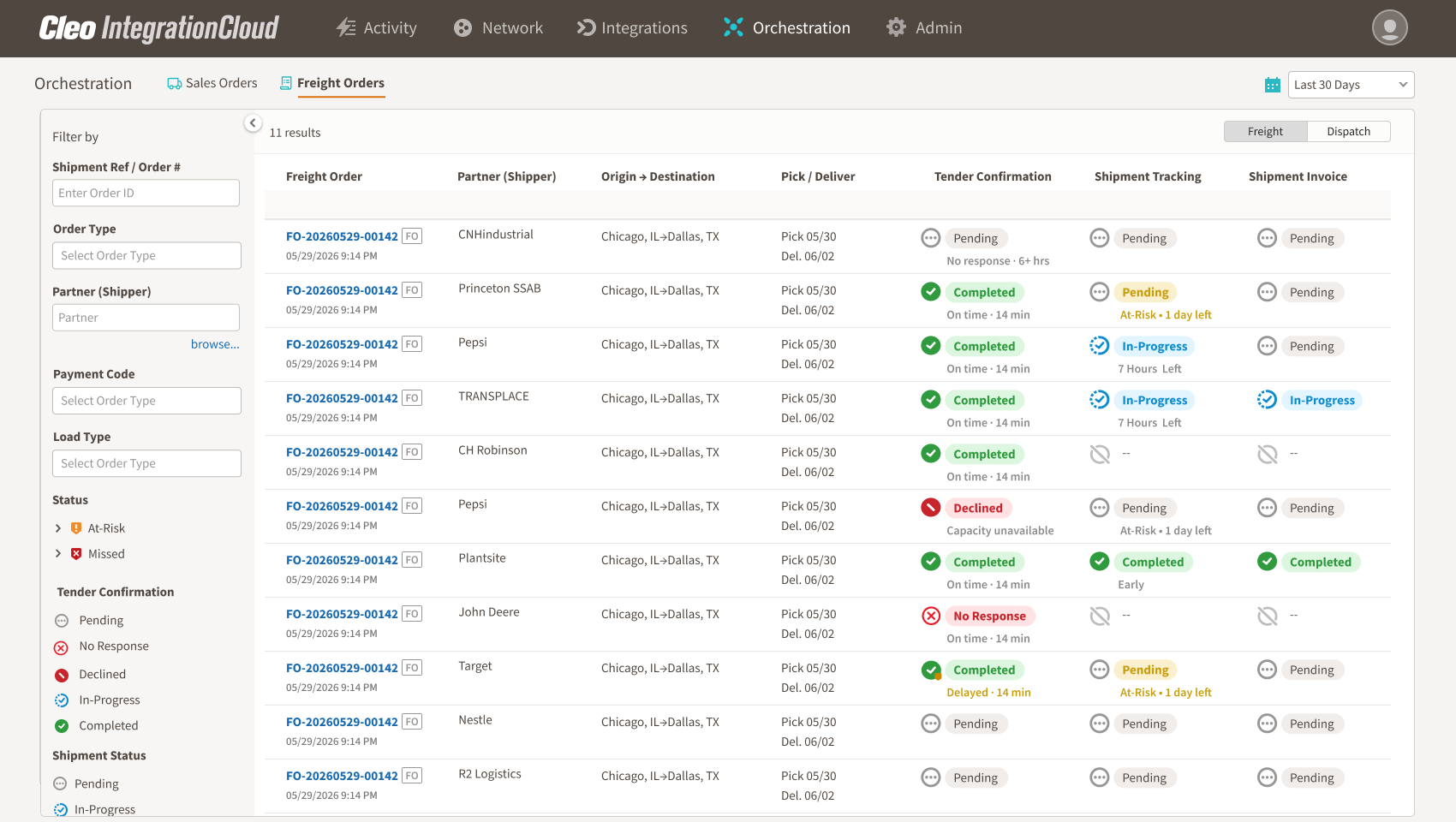
Instead of presenting every EDI message as a separate technical event, Freight Order Execution organizes tender, response, shipment-status, delivery, and invoice activity around the freight order. Carrier operations, customer service, billing, and integration teams gain shared context while the TMS remains the operational system of record.
Link EDI 204, 990, 214, and 210 activity to the freight order so operations, customer service, billing, and integration teams work from the same lifecycle.
Surface freight orders that need attention, including unanswered tenders, missing shipment milestones, at-risk stops, and delivered loads awaiting an invoice.
Use EDI 204, 990, 214, and 210 activity already flowing through Cleo Integration Cloud to create a connected, business-friendly operating view.
The four-transaction freight execution loop
EDI 204: Motor Carrier Load Tender
The EDI 204 is used by a shipper or another interested party to offer a shipment to a truckload motor carrier. The transaction can carry information such as scheduling, equipment requirements, commodities, and shipping instructions. For the carrier, it starts the freight-order journey: a load has been offered and requires a response or another action.
The business question
What freight has been offered, by which partner, for which lane and timing—and has the carrier responded?
EDI 990: Response to a Load Tender
The EDI 990 is used as a response to a load tender. It records the carrier’s response to a specific offered shipment. When connected to the 204, the 990 turns an inbound offer into a visible decision: accepted, declined, or still awaiting a response in the carrier’s business workflow.
The business question
Did the carrier respond to the tender, and what is the current acceptance status?
EDI 214: Transportation Carrier Shipment Status
The EDI 214 communicates shipment status information. In the operating journey, it supplies the pickup, transit, stop, delivery, and exception milestones that show how an accepted load is progressing. Carrier and partner implementation guides determine the exact events and codes in use.
The business question
Is the load progressing as expected, or is a required status event missing or late?
EDI 210: Motor Carrier Freight Details and Invoice
The EDI 210 carries motor-carrier freight details and invoice information. In the connected journey, it supplies the financial milestone that follows completed transportation service.
The business question
Has the carrier submitted the expected invoice for the delivered freight order?
The value is in the connection—not the document count
Transaction monitoring answers whether a file was received, translated, or delivered. Freight order execution asks whether the business journey is healthy. That distinction matters because a carrier can have technically successful EDI traffic and still have an operational exception.
- A 204 arrived, but no response is visible within the expected time.
- A 990 accepted the load, but the next qualifying 214 milestone has not appeared.
- The 214 shows delivery, but no corresponding 210 has been detected.
- Tender volume from a strategic partner is materially different from its recent pattern.
These are not merely document errors. They are business conditions that can affect service, customer relationships, revenue, and cash flow.
How to build a freight-order view
Step 1: Choose the business identifiers
Determine which references reliably connect the tender, response, shipment status, and invoice in each partner implementation. Do not assume every shipper uses identical reference conventions.
Step 2: Normalize the milestones
Translate partner-specific messages into a consistent business journey: tender received, response recorded, pickup confirmed, in transit, delivered, and invoiced. Retain the original transaction detail so teams can investigate without losing source context.
Step 3: Define expected timing
Set expectations for tender response, shipment-status cadence, delivery, and invoice timing. Use partner, lane, customer, and operational context where appropriate instead of applying one static threshold to every load.
Step 4: Detect missing events
Look for the next milestone that should have happened but did not. Absence is often more valuable than another confirmation that a healthy load is moving normally.
Step 5: Route the exception
Make the signal usable by dispatch, operations, customer service, billing, and IT. Each team should see the freight-order context and the transaction history behind the alert.
Step 6: Close the loop
Record how the exception was resolved and whether the freight order returned to a healthy state. The operating view should reduce repeat investigation, not simply generate more alerts.
Three high-value exception patterns
Unanswered tender
A 204 has been received, but the carrier response is not visible in the expected window. The condition may require operations or integration investigation before it affects the opportunity to accept the freight.
Accepted load missing a status milestone
The 990 indicates acceptance, but a qualifying 214 status has not arrived when expected. Customer service or operations can investigate while there is still time to clarify the shipment state.
Delivered load missing an invoice
A 214 records delivery, but the corresponding 210 is absent beyond the expected billing period. Billing can prioritize the order before the delay becomes an avoidable cash-flow issue.
What each team gains from the connected view
Dispatch and operations
A focused queue of unanswered tenders, at-risk loads, and missing milestones rather than another screen showing every transaction.
Customer service
The partner, route, stop, timing, and transaction context needed to investigate before a shipper escalates.
Billing
Visibility into delivered orders that have not progressed to the expected invoice milestone.
EDI and integration teams
Business context around technical activity, helping distinguish a transmission issue from an operational or process exception.
Where AI can help—and where judgment remains essential
Historical EDI behavior and partner context can help surface unusual activity that static thresholds may miss. Examples include unexpected changes in tender volume or freight orders whose milestone pattern looks abnormal relative to comparable activity.
The signal should guide investigation, not declare a business outcome. A volume drop does not prove a shipper reallocated freight. A missing transaction does not prove a person failed. Partner requirements, operational context, and team judgment remain essential.
Where Freight Order Execution fits
Cleo Freight Order Execution links the EDI 204, 990, 214, and 210 transactions already flowing through Cleo Integration Cloud. It presents the tender-to-invoice journey in a business-friendly operating view and helps carrier teams focus on exceptions such as unanswered tenders, missing shipment milestones, and delivered loads awaiting an invoice.
Because the solution uses existing freight EDI and complements an established TMS, it gives operations, customer service, billing, and IT a shared execution context without positioning itself as a replacement planning system.
Frequently asked questions
Do all carriers use these four transactions in exactly the same way?
No. The transaction sets establish common business purposes, but individual trading partners use implementation guides and requirements that shape fields, codes, timing, and validation. Build business rules against the actual partner context.
Is an EDI dashboard the same as freight order execution?
No. An EDI dashboard commonly emphasizes transaction processing and technical status. Freight order execution connects those messages into a business journey and prioritizes exceptions that require operational action.
Does this replace real-time tracking or a TMS?
No. The connected EDI view complements the TMS and other operational systems. Its value is the shared context across tender, response, shipment milestone, delivery, and invoice activity.
From four messages to one operating control loop
The 204, 990, 214, and 210 already describe critical stages of the carrier journey. When they remain separate, teams monitor documents. When they are connected to the freight order, teams can manage exceptions. That shift—from observing traffic to directing attention—is the foundation of freight order execution.
Sources and product references
- Cleo Freight Order Execution — Product capabilities, positioning, use cases, and FAQs.
- X12 EDI 204 transaction set — Official transaction-set description.
- X12 EDI 990 transaction set — Official transaction-set description.
- X12 EDI 214 transaction set — Official transaction-set description.
- X12 EDI 210 transaction set — Official transaction-set description.
See the complete freight order journey in one connected view
Connect tender, response, shipment-status, delivery, and invoice activity so carrier teams can focus on the exceptions that need action.
Explore Freight Order Execution