From freight EDI activity to business action
Cleo is a supply chain orchestration software company. Its AI-powered Cleo Integration Cloud brings API, EDI, managed file transfer, non-EDI integrations, application connectivity, and managed services together for revenue-critical business processes. Cleo Freight Order Execution applies that connected data to the carrier tender-to-invoice lifecycle.
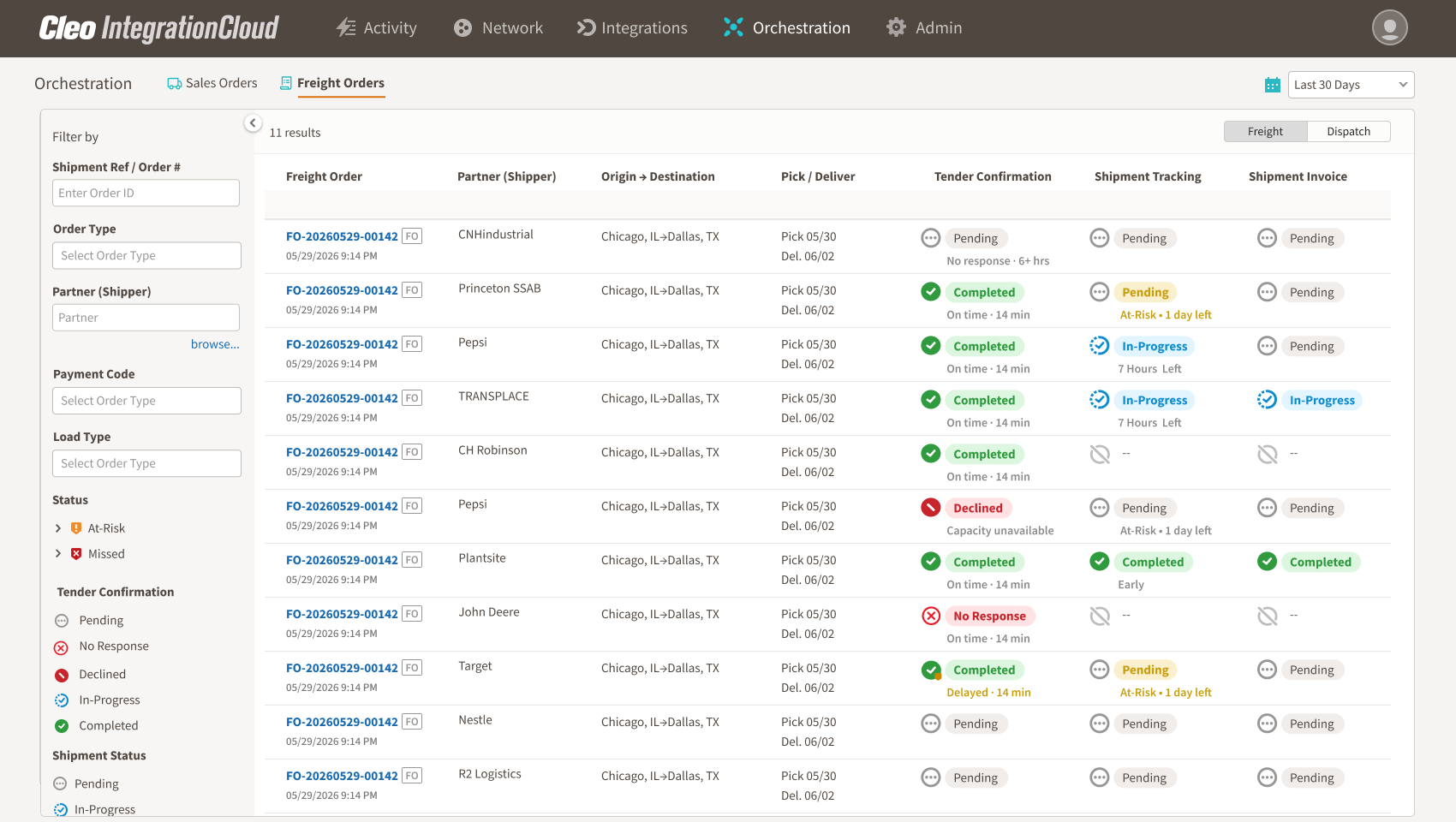
Instead of presenting every EDI message as a separate technical event, Freight Order Execution organizes tender, response, shipment-status, delivery, and invoice activity around the freight order. Carrier operations, customer service, billing, and integration teams gain shared context while the TMS remains the operational system of record.
Compare current EDI 204 activity with historical partner and lane patterns to surface unusual volume changes for investigation.
Surface freight orders that need attention, including unanswered tenders, missing shipment milestones, at-risk stops, and delivered loads awaiting an invoice.
Use EDI 204, 990, 214, and 210 activity already flowing through Cleo Integration Cloud to create a connected, business-friendly operating view.
Why tender-volume changes are difficult to see
Nothing technically failed
When an EDI 204 does not arrive, there may be no failed transaction, rejection, or system error to investigate. The absence is a business pattern, not necessarily a technical exception.
Freight volume is naturally variable
Tender counts change with seasonality, day of week, holidays, promotions, plant schedules, lane changes, capacity plans, and customer demand. A simple “below last week” rule can create too many false alarms.
Portfolio averages hide local changes
Total freight volume can appear stable even when one strategic partner or lane declines. Growth elsewhere can mask the change unless activity is analyzed at the right level.
The evidence is split across teams
IT can see EDI traffic, operations can see active loads, and account teams know the commercial relationship. Without one shared context, each group sees only part of the signal.
Start with the right business question
The most useful question is not “Did volume go down?” It is “Is current tender activity unexpectedly low for this partner, lane, and period, given the recent pattern and known context?”
That wording matters. It frames the result as a signal for investigation. It also creates room for expected explanations such as seasonality, planned facility shutdowns, customer schedule changes, or data-quality issues.
A seven-step framework for detecting tender drops
Step 1: Define eligible tender activity
Start with the EDI 204 activity that represents genuine inbound freight offers for the use case. Exclude test traffic, duplicates, cancelled flows, partners without sufficient history, and other activity that would distort the baseline.
Step 2: Choose the level of analysis
Monitor at the level where a change would be actionable. Depending on the account, that may be trading partner, shipper, business unit, origin-destination pair, lane, facility, equipment type, or a combination.
Step 3: Build an expected pattern
Use recent eligible activity to establish what normal looks like. Account for recurring weekly behavior and other known patterns. A Monday tender count should not necessarily be compared with a Saturday, and a seasonal lane should not be judged against a year-round one.
Step 4: Compare expected and actual tenders
Measure the difference between the current period and the expected range. The signal should consider both absolute and relative change: a drop of ten tenders can be material for one partner and immaterial for another.
Step 5: Add partner and operational context
Before escalating, check for known explanations: planned shutdowns, holidays, contractual changes, lane transitions, connection problems, or changes in how a partner transmits tenders. This context reduces noise and helps the receiving team investigate intelligently.
Step 6: Prioritize the signal
Rank the exception using factors such as strategic-account importance, magnitude and duration of the deviation, affected lanes, recent acceptance behavior, and whether the pattern is isolated or widespread.
Step 7: Assign and record the investigation
Route the signal to an account, operations, or integration owner. Capture the outcome so future alerts can distinguish known business changes from unexplained anomalies.
What a useful alert should contain
A useful alert explains the deviation instead of presenting a red number without context.
- The affected shipper or trading partner
- The lane, facility, or segment involved
- Actual tender count for the current period
- Expected range or recent comparison pattern
- Magnitude and duration of the deviation
- The time of the last qualifying tender
- Known calendar or operational context
- Related acceptance, decline, or service signals
- Suggested owner and investigation status
How to avoid noisy tender-volume alerts
Avoid a single static threshold
One universal threshold ignores differences in account size, lane cadence, and seasonality. Use partner-level context and enough history to recognize normal variation.
Avoid treating one quiet interval as a trend
The right observation window depends on the business. A short interruption can matter for a high-frequency lane, while a lower-frequency account may require a longer view.
Avoid separating the alert from recent execution
Tender volume is more meaningful when viewed alongside response and shipment performance. A commercial change may have a different explanation if it follows repeated declines, missing status updates, or service exceptions.
Avoid sending the same alert to everyone
A possible connection problem belongs with integration teams. A strategic partner change may belong with account leadership. A lane-specific operational question may belong with operations. Shared context should support focused ownership.
Questions the investigation should answer
- Is the decline real, or could a connection, mapping, or partner-process change explain it?
- Is the change limited to one lane, facility, day, or equipment type?
- Did tender acceptance or decline behavior change before volume changed?
- Were there recent service exceptions or missing shipment-status milestones?
- Is the pattern consistent with a known seasonal or contractual change?
- Who should contact the shipper, and what evidence should they bring?
Metrics for managing the signal
Track alert precision and operational usefulness, not simply alert volume. Useful measures include alerts investigated, alerts explained by known context, time from detection to review, unresolved deviations by strategic account, and volume restored or reclassified after investigation.
The goal is not to maximize the number of warnings. It is to give teams more time to understand meaningful changes.
Where Freight Order Execution fits
Cleo Freight Order Execution uses historical EDI behavior, partner context, and connected freight milestones to surface unusual activity. One of its stated use cases is comparing expected and actual tender activity so carrier account and operations teams can spot partner- or lane-level changes earlier.
The signal sits within a broader tender-to-invoice operating view built from EDI 204, 990, 214, and 210 activity. This helps teams investigate the change alongside tender response, shipment progress, delivery, and invoicing context rather than viewing volume in isolation.
Frequently asked questions
Does a drop in EDI 204 volume mean a shipper moved freight to another carrier?
No. It can be consistent with many explanations, including demand, seasonality, scheduling, lane changes, planned operational events, connectivity issues, or allocation decisions. The signal identifies where to investigate; it does not establish the cause.
How much history is required?
Enough to represent the recurring pattern for the specific account and lane. The appropriate window depends on frequency and seasonality. New or sporadic partners may not have enough history for a reliable baseline.
Should carriers monitor partner-level or lane-level volume?
Both can matter. Partner-level monitoring shows the account relationship; lane-level monitoring can reveal a localized shift hidden inside stable total volume. Use the level at which a team can take action.
Is this an EDI monitoring use case?
It uses EDI data, but it is a business-pattern use case rather than a conventional file-failure alert. The important event is the unexpected absence or decline of eligible tender activity.
Turn silence into time to investigate
Carriers already receive a continuous record of tender activity through EDI 204. The opportunity is to interpret that activity in context. By learning the expected pattern, comparing it with actual volume, and routing meaningful deviations to the right owner, carriers can investigate quiet changes before they become obvious through a customer escalation or a revenue report.
Sources and product references
- Cleo Freight Order Execution — Product capabilities, positioning, tender-volume use case, and alert guardrails.
- X12 EDI 204 transaction set — Official transaction-set description.
- X12 EDI 990 transaction set — Official transaction-set description.
- X12 EDI 214 transaction set — Official transaction-set description.
- X12 EDI 210 transaction set — Official transaction-set description.
See the complete freight order journey in one connected view
Connect tender, response, shipment-status, delivery, and invoice activity so carrier teams can focus on the exceptions that need action.
Explore Freight Order Execution