What is an EDI 990?
An EDI 990, also known as a Response to Load Tender, is an EDI transaction set that a motor carrier uses to accept or reject a shipment offer from a shipper. This transaction is triggered upon the receipt of a Motor Carrier Load Tender transaction or EDI 204 document.
The EDI 990 is utilized by manufacturers, distributions centers, wholesalers, within the shipping and transportation industry to communicate whether or not a specific shipment will be picked up by the shipper. One of five responses may be communicated using an EDI 990 for a given shipment offer:
- Tender accepted
- Tender declined
- Tender accepted with conditions
- Spot bid request accepted (w/ freight quote bid amount)
- Spot bid request declined
How is an EDI 990 used?
The EDI 990 is used by motor carriers to communicate a response to an EDI 204 Motor Carrier Load Tender Transaction Set throughout the supply chain. The carrier response will tell the shipper whether or not it will pick up an offered shipment. The EDI 990 is used exclusively for full truckload shipments. After an EDI 990 is received by the shipper, the shipper will respond with an EDI 997 Functional Acknowledgement, thereby confirming receipt of the EDI 990.
Example EDI 990 transaction exchange:
Because the EDI 990 serves as a response to an EDI 204 transaction, you can start to grasp where the EDI 990 falls in terms of a normal load-tender-to-invoice cycle.
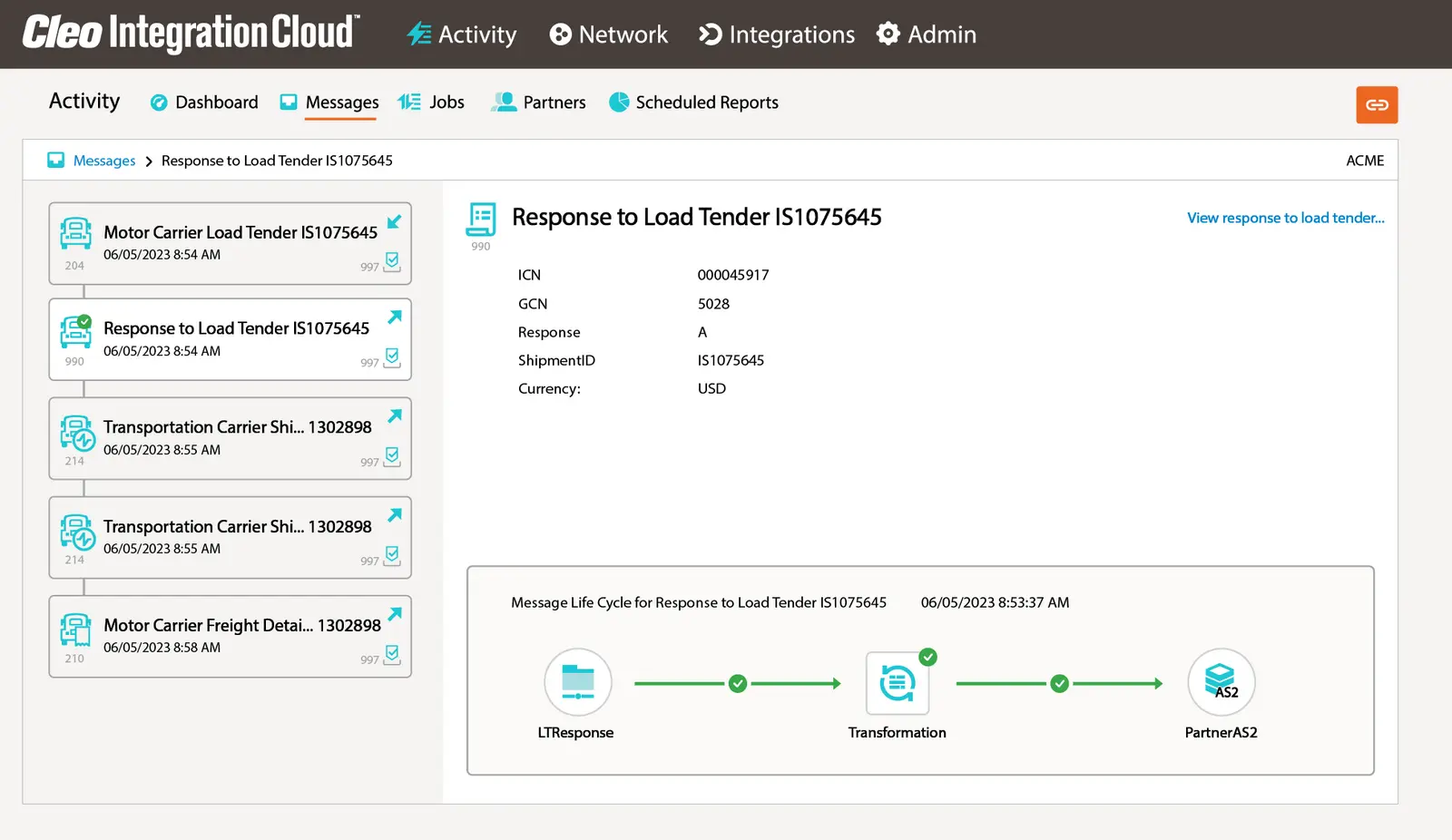
Here is an example of where the EDI 990 fits in within the transaction series:
- First, an EDI 204 Motor Carrier Load Tender tenders an offer for a shipment to a carrier.
- The carrier responds with an EDI 990 Response to a Load Tender transaction set, indicating whether it accepts or declines the offer to tender a shipment.
- If the tender is accepted by the carrier, the carrier will then send an EDI 214 Shipment Status Report to inform the shipper of pick-up and delivery information.
- Finally, an EDI 210 Motor Carrier Freight Details and Invoice is sent by the carrier to the shipper or consignee to request payment for freight charges.
EDI 990 Document Components
An EDI 990 document should have a clear response and specific identification details for a particular shipment.
Key components of EDI 990 include:
- Shipment Identification Number
- Shipper and Carrier Contact Information
- Indication of Acceptance, Rejection, or Acceptance with Conditions
- Reason for Declining (if applicable)
EDI 990 Formats
Web EDI 990 Document
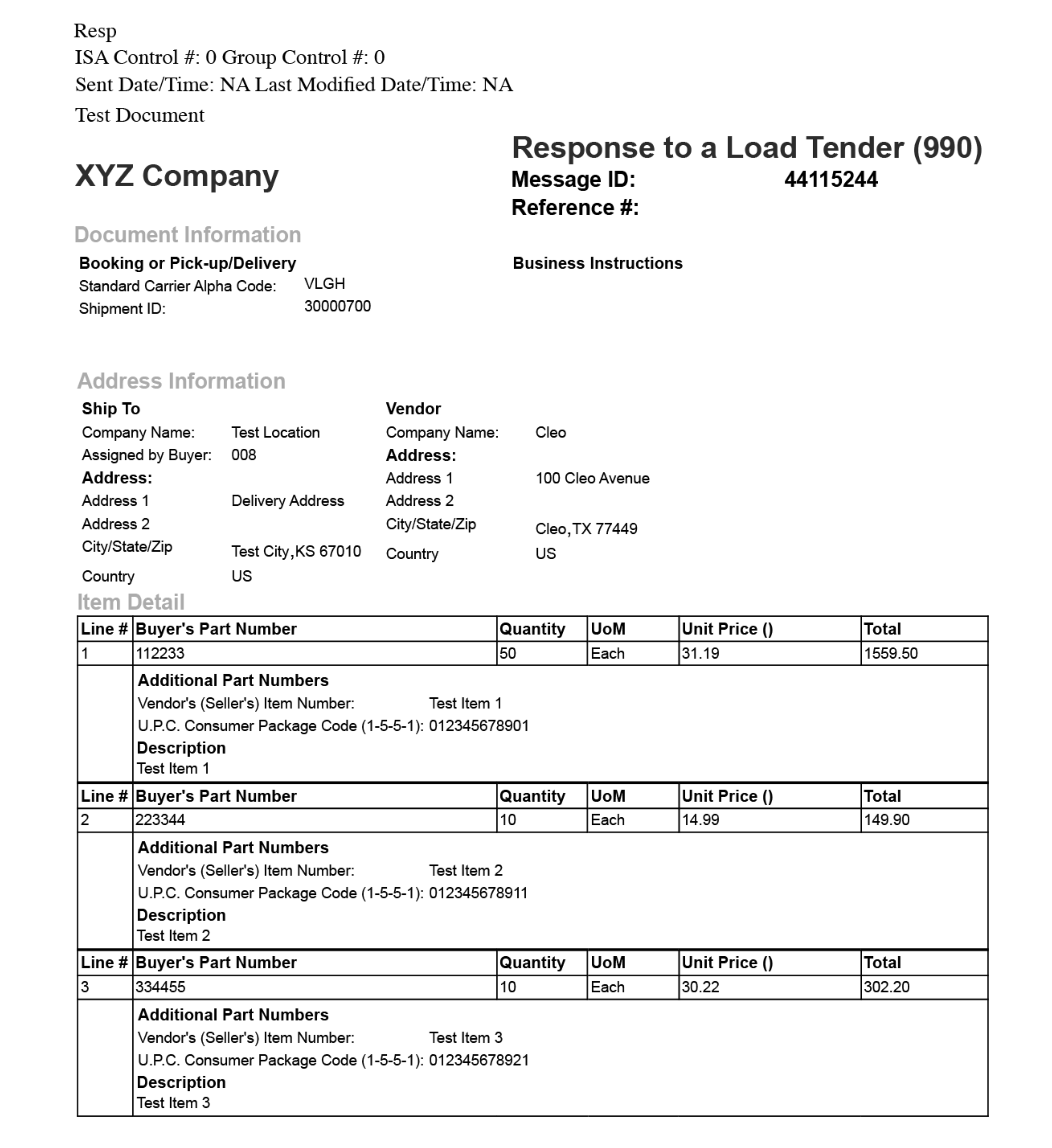
Below is a graphical, user-friendly representation of the EDI 990 transaction, accessed through a web portal. It's typically used by small or mid-sized suppliers who don’t have an integrated EDI system. These users log into a web-based EDI platform to view, complete, and submit a 990 document using form fields (e.g., carrier info, load acceptance status, shipment ID).

EDI 990 Data Format: Original Message vs Translated Message
Raw EDI 990 Data Format
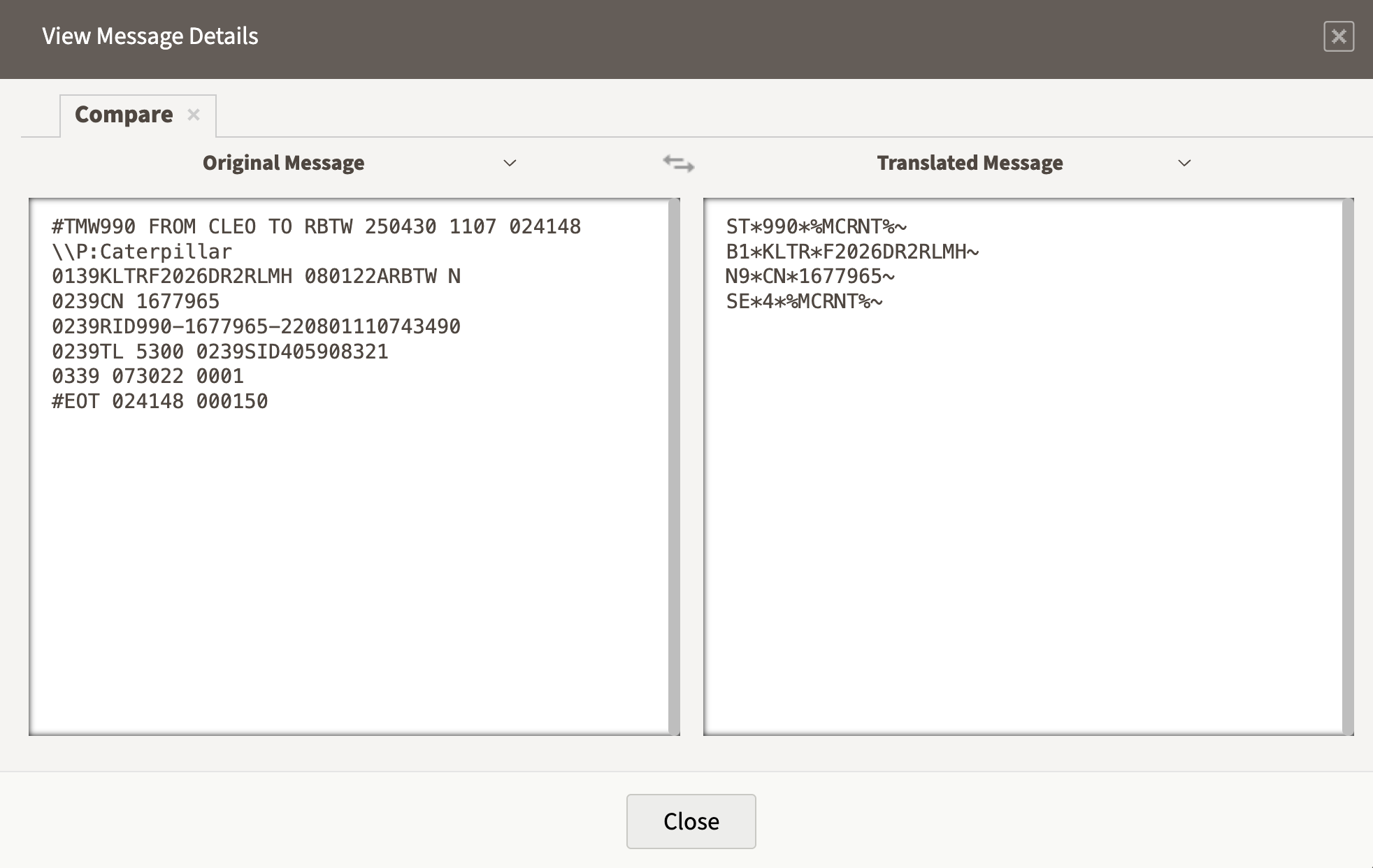
The raw EDI 990 is the machine-readable format that is transmitted between systems over an EDI network.

Here is a breakdown of the translated EDI 990 message on the right:
ST*990*%MCRNT%~ → Transaction Set Header (990 = Response to Load Tender)
B1*KLTR*F2026DR2RLMH~ → Beginning Segment for Booking
N9*CN*1677965~ → Reference Identification (e.g., load or shipment ID)
SE*4*%MCRNT%~ → Transaction Set Trailer (segment count and control number)
EDI 990 Transaction Flow
EDI 990 Specification
This X12 Transaction Set contains the format and establishes the data contents of the Response to a Load Tender Transaction Set (990) for use within the context of an Electronic Data Interchange (EDI) environment. The transaction set can be used to provide general information relative to a specific shipment. The Response to a Load Tender is used as the response to a Motor Carrier Load Tender Transaction Set (204) which has been used as a load tender.
Sources
Accredited Standards Committee X12. ASC X12 Standard [Table Data]. Data Interchange Standards Association, Inc., Falls Church, VA. https://x12.org/index.php/products/transaction-sets/transaction-sets

Automate EDI 990 Transactions
Eliminate manual EDI integration flows by automating and orchestrating EDI and API-based transactions in an intuitive self-service, low-code development environment.
Not ready for self-service EDI? Learn about Cleo’s EDI Managed Services team to get you up and running.
Keep a list of all X12 EDI transaction sets at hand.
Access a free EDI Transaction Set Guide
More EDI Resources
Explore additional EDI resources to deepen your understanding and enhance your proficiency in Electronic Data Interchange.
-
 3 Ways to Become EDI Compliant & Eliminate EDI Chargebacks
Many major companies have requirements for EDI trading partner setup and maintenance, both of which are important in keeping compliant...
Read the Blog
-
 EDI Visibility & Business Insights
23% of companies say visibility is one of their biggest integration challenges. Let's analyze this issue and unleash a powerful solution...
Read More
-
 EDI Integration in Action
Explore a curated list of videos to help you understand the unprecedented value of EDI integration...
Start Watching